Cheatsheets:PlantUML: Difference between revisions
Common syntax: document ~ escape character (literal HTML / double brackets), comments start on a newline (no trailing comments) (AI-assisted (RonzzWikiCowriter)) (via update-page on MediaWiki MCP Server) |
|||
| Line 333: | Line 333: | ||
comment '/ | comment '/ | ||
title Order flow | title Order flow | ||
header v1.0 | ' diagram title | ||
footer page %page% of %lastpage% | header v1.0 | ||
' repeated header | |||
footer page %page% of %lastpage% | |||
' %page%/%lastpage%: page numbers | |||
</syntaxhighlight> | </syntaxhighlight> | ||
<blockquote> | <blockquote> | ||
Comments start with <syntaxhighlight lang="text" inline>'</syntaxhighlight> — not <syntaxhighlight lang="text" inline>//</syntaxhighlight>. In a header/footer, <syntaxhighlight lang="text" inline>%page%</syntaxhighlight> / <syntaxhighlight lang="text" inline>%lastpage%</syntaxhighlight> become page numbers once the diagram spans several pages. | '''Comments''' — start with <syntaxhighlight lang="text" inline>'</syntaxhighlight> at the beginning of a new line — not <syntaxhighlight lang="text" inline>//</syntaxhighlight>, and '''never as a trailing comment''': <syntaxhighlight lang="text" inline>title Order flow ' diagram title</syntaxhighlight> prints the <syntaxhighlight lang="text" inline>' diagram title</syntaxhighlight> verbatim. Multi-line comments open with <syntaxhighlight lang="text" inline>/'</syntaxhighlight> and close with <syntaxhighlight lang="text" inline>'/</syntaxhighlight>. | ||
'''Escaping''' — <syntaxhighlight lang="text" inline>~</syntaxhighlight> is the escape character; prefix a special character with it to print it literally instead of interpreting it as creole markup. <syntaxhighlight lang="text" inline>~<b>Hello World~</b></syntaxhighlight> renders the literal <syntaxhighlight lang="text" inline><b>Hello World</b></syntaxhighlight> (not bold text); <syntaxhighlight lang="text" inline>~[[Wiki Home]]</syntaxhighlight> renders the literal <syntaxhighlight lang="text" inline>[[Wiki Home]]</syntaxhighlight> (not a wiki link). | |||
In a header/footer, <syntaxhighlight lang="text" inline>%page%</syntaxhighlight> / <syntaxhighlight lang="text" inline>%lastpage%</syntaxhighlight> become page numbers once the diagram spans several pages. | |||
</blockquote> | </blockquote> | ||
| Line 388: | Line 395: | ||
Alice -> Bob: Ship order | Alice -> Bob: Ship order | ||
Bob --> Alice: OK | Bob --> Alice: OK | ||
@enduml | |||
</uml> | |||
|- | |||
| | |||
<syntaxhighlight lang="text" copy> | |||
@startuml | |||
Alice -> Bob: ~<b>Hello World~</b> | |||
Alice -> Bob: ~[[Wiki Home]] | |||
Bob --> Alice: done | |||
@enduml | |||
</syntaxhighlight> | |||
|| | |||
<uml> | |||
@startuml | |||
Alice -> Bob: ~<b>Hello World~</b> | |||
Alice -> Bob: ~[[Wiki Home]] | |||
Bob --> Alice: done | |||
@enduml | @enduml | ||
</uml> | </uml> | ||
Revision as of 02:35, 30 August 2026
Quick reference for smart people — part of our dev cheatsheets collection.
PlantUML is a text-based diagramming language: describe a diagram in a few lines of plain text, render it to PNG, SVG, or ASCII art. The source is just text, so diagrams live in version control and diff cleanly. One syntax covers sequence, class, use case, activity, state, component and deployment diagrams.
New to PlantUML? The Quick Start Guide may interest you.
Basic example
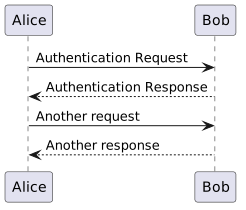
Wrap every diagram in @startuml ... @enduml, save as .puml and render — see Rendering:
| Source (.puml) | Rendered |
|---|---|
@startuml
Alice -> Bob: Authentication Request
Bob --> Alice: Authentication Response

Alice -> Bob: Another request
Alice <-- Bob: Another response
@enduml
|
 |
Sequence diagrams
The workhorse. A message is sender arrow receiver: text — the text after the colon is the label.
| Arrow | Renders as |
|---|---|
-> |
solid line, no arrowhead |
--> |
dashed line, no arrowhead (typical reply) |
->> |
solid line with arrowhead |
-->> |
dashed line with arrowhead |
-x |
line ending in a cross (destroys the lifeline) |
-) |
line ending in an open arrowhead |
Solid for synchronous calls, dashed for replies and asynchronous messages.
Participants — declare to control order and role. as NAME gives an alias: the quoted text is displayed, the alias is used in messages.
@startuml
participant "Web App" as WA
actor "Customer" as C
database "Postgres" as DB
entity E
control Ctrl
boundary B
queue Q
@enduml
Role keywords: actor, participant, database, entity, control, boundary, queue.
Activations, notes and fragments:
| Source (.puml) | Rendered |
|---|---|
@startuml
participant "Web App" as WA
database "Postgres" as DB

WA -> DB: SELECT * FROM orders
activate DB
DB --> WA: rows
deactivate DB

note right of DB: covered by index

alt rows found
  WA -> WA: render table
else empty
  WA -> WA: show placeholder
end

loop retry x3
  WA -> WA: backoff
end
@enduml
|
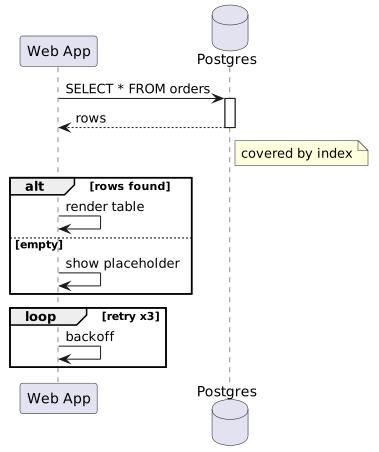 |
activate / deactivate — draw a lifeline bar. Shorthand:
DB ++...DB --;return valuesends a dashed reply and deactivates.Fragments —
alt/else,opt,loop,par/and,break,critical,group label— all close withend.Notes —
note left of X,note right of X,note over X,note over X, Y.Numbering —
autonumberlabels messages 1, 2, 3...
Class diagrams
| Source (.puml) | Rendered |
|---|---|
@startuml
class Animal {
  +name: string
  -age: int
  +speak(): void
}

Animal <|-- Dog
Dog *-- Collar
@enduml
|
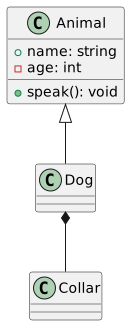 |
Visibility markers: + public, - private, # protected, ~ package. Kinds: abstract class, interface, enum.
Relations — labels and multiplicities go at the ends:
| Symbol | Meaning |
|---|---|
Animal <|-- Dog |
inheritance (also class Dog extends Animal)
|
..|> |
realization (implements an interface) |
*-- |
composition |
o-- |
aggregation |
-- / --> |
association |
..> |
dependency |
Dog "1" *-- "0..*" Collar : has
Use case diagrams
| Source (.puml) | Rendered |
|---|---|
@startuml
left to right direction
actor Customer
rectangle "Web shop" {
  (Login)
  (Browse catalog)
}
Customer --> (Login)
(Login) ..> (Browse catalog) : include
@enduml
|
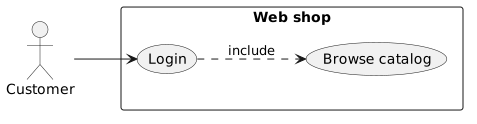 |
Use cases in parentheses (Login) or usecase "Login" as L; boundaries with rectangle "name" { ... } or package. Dotted arrows express include / extend.
Activity diagrams
| Source (.puml) | Rendered |
|---|---|
@startuml
start
:Fetch order;
if (in stock?) then (yes)
  :Ship order;
else (no)
  :Notify customer;
endif
stop
@enduml
|
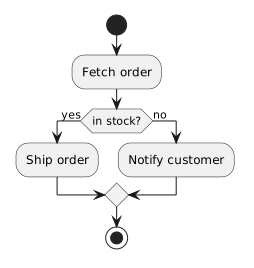 |
:action; is a step; if (cond) then (yes) ... else (no) ... endif a decision. Also while (cond) ... endwhile and fork ... end fork for concurrency.
State diagrams
| Source (.puml) | Rendered |
|---|---|
@startuml
[*] --> Idle
Idle --> Running : start()
Running --> Idle : stop()
Running --> [*] : terminate
@enduml
|
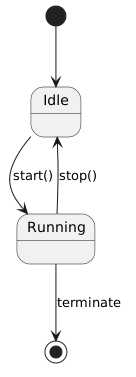 |
[*] is the initial/final state; State --> State : event labels a transition. Long names: state "Waiting for input" as Waiting.
Component & deployment
| Source (.puml) | Rendered |
|---|---|
@startuml
node "Server" {
  [Web] --> [App]
}
node "Database" {
  database "Postgres" as pg
}
[App] --> pg
@enduml
|
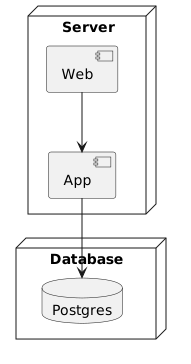 |
Square brackets for components, database "name" for datastores, node "name" { ... } / package { ... } for containers.
Common syntax
Comments and document-level decorations — title, header, footer, legend:
' single-line comment
/' multi-line
   comment '/

title Order flow
' diagram title
header v1.0
' repeated header
footer page %page% of %lastpage%
' %page%/%lastpage%: page numbers
Comments — start with
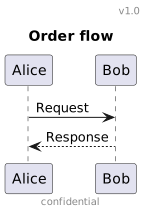
'at the beginning of a new line — not//, and never as a trailing comment:title Order flow ' diagram titleprints the' diagram titleverbatim. Multi-line comments open with/'and close with'/.Escaping —
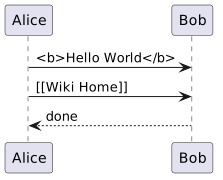
~is the escape character; prefix a special character with it to print it literally instead of interpreting it as creole markup.~<b>Hello World~</b>renders the literal<b>Hello World</b>(not bold text);~[[Wiki Home]]renders the literal[[Wiki Home]](not a wiki link).In a header/footer,
%page%/%lastpage%become page numbers once the diagram spans several pages.
| Source (.puml) | Rendered |
|---|---|
@startuml
title Order flow
header v1.0
footer confidential

Alice -> Bob: Request
Bob --> Alice: Response
@enduml
|
 |
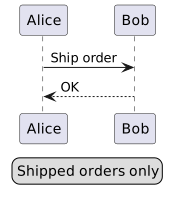
@startuml
legend right
Shipped orders only
endlegend

Alice -> Bob: Ship order
Bob --> Alice: OK
@enduml
|
 |
@startuml
Alice -> Bob: ~<b>Hello World~</b>
Alice -> Bob: ~[[Wiki Home]]
Bob --> Alice: done
@enduml
|
 |
Notes
A note is a box of text attached to an element of any diagram type — participant, class, state, use case, link. Sequence-diagram notes are covered in Sequence diagrams; here is the general shape:
| Source (.puml) | Rendered |
|---|---|
@startuml
class Animal

note left of Animal : speaks
note right of Animal : eats
note top of Animal : alive
note bottom of Animal : breathes
@enduml
|
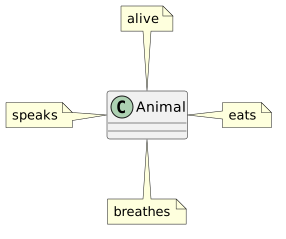 |
Placement —
left of X,right of X,top of X,bottom of X, works in the single line format with the text after a colon, but may not work with other note syntaxes in some scenarios.
In sequence diagrams
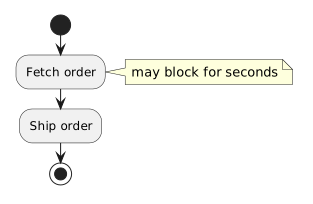
over X/over X, Yspan one or a range of participants; in activity diagramsnotealone (ornote right) floats beside the current step.
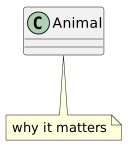
Long text, or several lines: open a note block and close with end note. A note with a quoted title becomes free-floating — attach it to an element with a dotted line:
| Source (.puml) | Rendered |
|---|---|
@startuml
start
:Fetch order;
note right
  may block for seconds
end note
:Ship order;
stop
@enduml |
 |
@startuml
class Animal

note "why it matters" as N1
Animal .. N1
@enduml |
 |
Theme
Swap the whole look with one directive at the top of the diagram — themes ship with PlantUML, nothing to install:
| Source (.puml) | Rendered |
|---|---|
@startuml
!theme spacelab
class Example {
  Theme spacelab
}
@enduml |
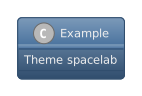 |
help themesrenders the full list of built-in themes.- Your own theme:
!theme foo from /path/to/folder— a file namedpuml-theme-foo.puml(remote URLs work too). - Some themes add message helpers:
$success("…"),$failure("…"),$warning("…").
Browse the gallery of official themes. Full reference: PlantUML Themes.
Style
CSS-like <style> blocks replace the deprecated skinparam. Selectors target everything (element), one diagram type (sequenceDiagram, classDiagram, …) or one element (participant, arrow, node, …):
| Source (.puml) | Rendered |
|---|---|
@startuml
<style>
element {
  BackGroundColor: #AAA;
}
sequenceDiagram {
  participant {
    FontColor: green;
    FontSize: 26;
    FontStyle: italic;
    LineColor: #E00;
  }
  arrow {
    FontColor: red;
    LineColor: blue;
  }
}
</style>

participant Alice
participant Bob
Alice -> Bob : hello
@enduml |
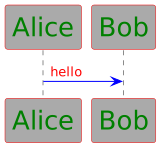 |
Common properties: FontColor, FontSize, FontStyle, FontName; BackGroundColor, LineColor, LineThickness, RoundCorner, Padding, Shadowing. Custom classes: tag an element as X <<primary>>, then style .primary { ... }.
Full reference: PlantUML Styles.
Rendering
| Tool | How |
|---|---|
| This wiki | <uml> ... </uml> — see rendering diagrams on this wiki
|
| CLI | java -jar plantuml.jar diagram.puml → diagram.png (Java required; GraphViz only for some diagram types)
|
| VS Code | PlantUML extension — Alt+D previews the diagram live
|
| Browser | plantuml.com online server; Kroki |
| GitLab | ```plantuml fenced blocks render natively (when enabled on the instance)
|
CLI options:
plantuml diagram.puml            # PNG (default)
plantuml -tsvg diagram.puml      # SVG
plantuml -tutxt diagram.puml     # ASCII art
plantuml -o out/ diagram.puml    # output directory
plantuml *.puml                  # whole directory
For more
- PlantUML — official site; every diagram type has its own page (sequence-diagram, class-diagram, use-case-diagram, …)
- Quick Start Guide — install, first diagram
- PlantUML Language Reference Guide — the full syntax
- PlantUML Themes — built-in themes, one-line look change
- PlantUML Styles — CSS-like styling, the skinparam replacement
- Kroki — render PlantUML inside Markdown, AsciiDoc, reStructuredText, …
- PlantUML VS Code extension