HowItWorks:Git: Difference between revisions
Creating HowItWorks:Git — AI-assisted (RonzzWikiCowriter) (via create-page on MediaWiki MCP Server) |
Fix Pro Git book link in Try it yourself — AI-assisted (RonzzWikiCowriter) (via update-page on MediaWiki MCP Server) |
||
| Line 214: | Line 214: | ||
== Try it yourself == | == Try it yourself == | ||
The web-based checks below were verified live on 2026-09-01; the local command outputs are reproduced from Git's official documentation (the | The web-based checks below were verified live on 2026-09-01; the local command outputs are reproduced from Git's official documentation (the Pro Git book<ref>{{#cite:Q1459}}</ref> and the git manual), as marked. | ||
<pre> | <pre> | ||
Revision as of 10:46, 1 September 2026
Explains how things actually work — part of our technology dissections collection.
Git is a free and open source distributed version control system, designed to handle everything from small to very large projects with speed and efficiency.[1] Written in C and released under the GNU General Public License v2, it was created by Linus Torvalds in April 2005 to manage the Linux kernel source code, and is today maintained by Junio C. Hamano.[2][3] Unlike most other version control systems, which store data as a list of file-based changes, Git stores data as a series of snapshots of a miniature filesystem.[4]
Git, a distributed version control system
A version control system (VCS) records changes to a set of files over time, so that any past version can be recalled later. Without one, a project is just a folder of files that only moves forward: a wrong edit cannot be undone, and two people editing the same files quickly overwrite each other.
Most older systems — CVS, Subversion, Perforce — are centralized: one server holds the canonical repository, and anything that needs history must travel over the network to that server. Git is distributed: every clone of a repository is a complete repository with the entire history, so nearly every operation can be done locally, without a network connection.[4]
Git has three main states that files can reside in — modified, staged and committed — matching the three main sections of a project: the working tree, the staging area, and the Git directory.[4]
- The working tree is a single checkout of one version of the project — the files on disk that you edit.[4]
- The staging area is a file, generally contained in the Git directory, that stores information about what will go into your next commit; its technical name is the "index".[4]
- The Git directory (normally
.git/) is where Git stores the metadata and object database of your project; it is what gets copied when you clone a repository.[4]
The basic Git workflow: you modify files in the working tree; you selectively stage the changes you want in the next commit, which adds them to the staging area; you commit, which takes the files as they are in the staging area and stores that snapshot permanently in the Git directory.[4]
A short history
Git was born out of the needs of the Linux kernel project. From 1991 to 2002, kernel changes were passed around as patches and archived files; in 2002, the project began using BitKeeper, a proprietary distributed version control system.[5]
In 2005, the relationship between the kernel community and the company that developed BitKeeper broke down, and the tool's free-of-charge status was revoked. That prompted the Linux development community — in particular Linus Torvalds, the creator of Linux — to build their own tool based on the lessons learned from BitKeeper. The stated goals of the new system: speed; simple design; strong support for non-linear development (thousands of parallel branches); fully distributed; and able to handle large projects like the Linux kernel efficiently.[5]
On April 7, 2005, Torvalds made the first commit to the new system — commit e83c5163 — with the self-deprecating message "Initial revision of 'git', the information manager from hell".[2] The name itself is a joke: "git" is British slang for an unpleasant person, and the README of that first commit lists what it "can mean anything, depending on your mood" — "global information tracker" when you are in a good mood, and "goddamn idiotic truckload of sh*t" when it breaks.[2] Git was able to manage its own source code from the start, and within months Torvalds handed the project over to Junio C. Hamano, who has maintained it ever since.[3]
In April 2008, GitHub launched as a web-based hosting service for Git repositories and grew into what its own description calls "the world's most widely adopted, AI-powered developer platform where millions of developers, businesses, and the largest open source community build software".[6] In August 2008, Git 1.6.0 became the project's first deliberately backward-incompatible ("breaking") release.[7]
In May 2014, Git 2.0 was released. Since then the project uses two-part major.minor release numbers; before that, releases were numbered 1.major.minor, with the jump to 2.0 reserved for "really large backward-compatibility breaking changes".[7]
On October 19, 2020, Git 2.29 introduced experimental support for the SHA-256 object format alongside the long-standing SHA-1.[8]
In April 2025, the project turned 20; the annual contributor conference Git Merge 2025 celebrated two decades of Git.[9]
As of September 2026, the latest feature release is Git 2.55.0, published on June 29, 2026.[1] The project is preparing Git 3.0, a breaking release that plans to make SHA-256 the default hash function for new repositories, switch the default reference storage to the reftable format, adopt "main" as the default branch name, and make Rust a mandatory part of the build.[7]
Components and interactions
A Git repository normally consists of a working directory with a .git subdirectory at the top level. The .git directory contains, among other things, a compressed object database representing the complete history of the project, an index file that links that history to the current contents of the working tree, and named pointers into that history — tags and branch heads.[3]
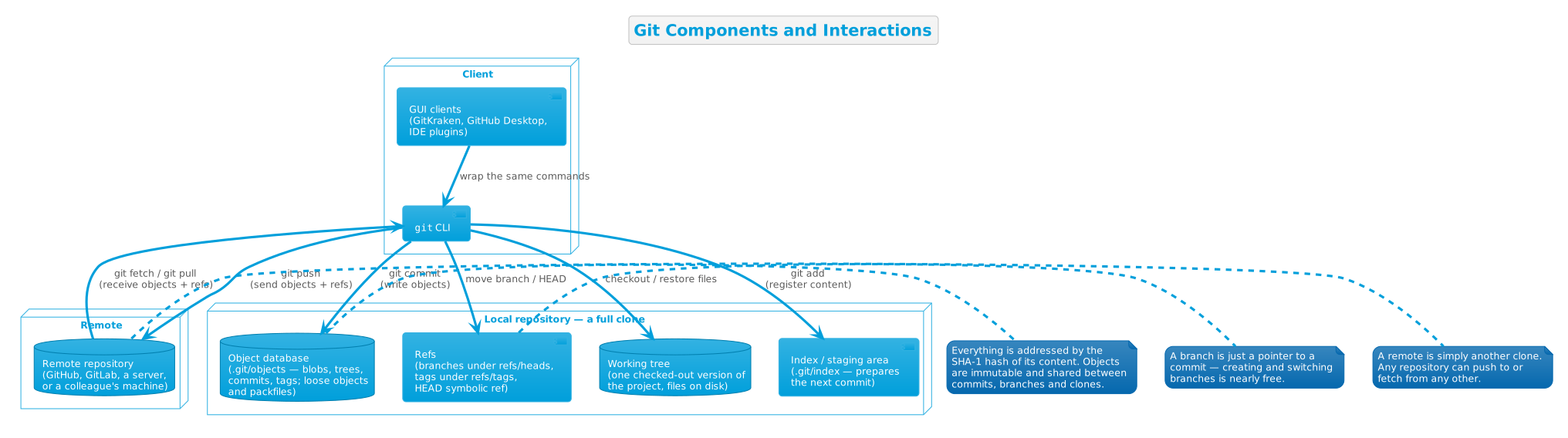
The main pieces:
- The object database — "objects of three main types: blobs, which hold file data; trees, which point to blobs and other trees to build up directory hierarchies; and commits, which each reference a single tree and some number of parent commits". A fourth object type, the annotated tag, exists to vouch for a specific commit. "All objects are named by the SHA-1 hash of their contents, normally written as a string of 40 hex digits. Such names are globally unique."[3] Git itself describes this as "a content-addressable filesystem... at the core of Git is a simple key-value data store: you can insert any kind of content into a Git repository, for which Git will hand you back a unique key you can use later to retrieve that content".[10]
- The index — the staging area on disk. It is "initialized with a list of all paths and, for each path, a blob object and a set of attributes" taken from the corresponding working-tree file; subsequent changes are found by comparing those attributes, and new commits are created from the content stored in the index.[3]
- Refs — "named pointers called refs mark interesting points in history. A ref may contain the SHA-1 name of an object or the name of another ref (the latter is called a 'symbolic ref')". Branch heads live under
refs/heads/, tags underrefs/tags/, and the symbolic refHEADnames the currently checked-out branch.[3] - Packfiles — "when first created, objects are stored in individual files, but for efficiency may later be compressed together into 'pack files'".[3]
- Porcelain and plumbing — Git deliberately splits its command set in two: "high level ('porcelain') commands" for everyday use —
git add,git commit,git log,git status— and "low level ('plumbing') commands" for scripting —git hash-object,git cat-file,git update-index,git write-tree. The low-level interfaces are "meant to be a lot more stable than Porcelain level commands, because these commands are primarily for scripted use".[3] - Remotes — other repositories to synchronize with.
git fetch"downloads objects and refs from another repository",git push"updates remote refs along with associated objects", andgit clone"clones a repository into a new directory".[3]
Git in action
Two flows cover most of everyday Git: recording a commit (the snapshot machine) and syncing with a remote (the distributed part).
Recording a commit
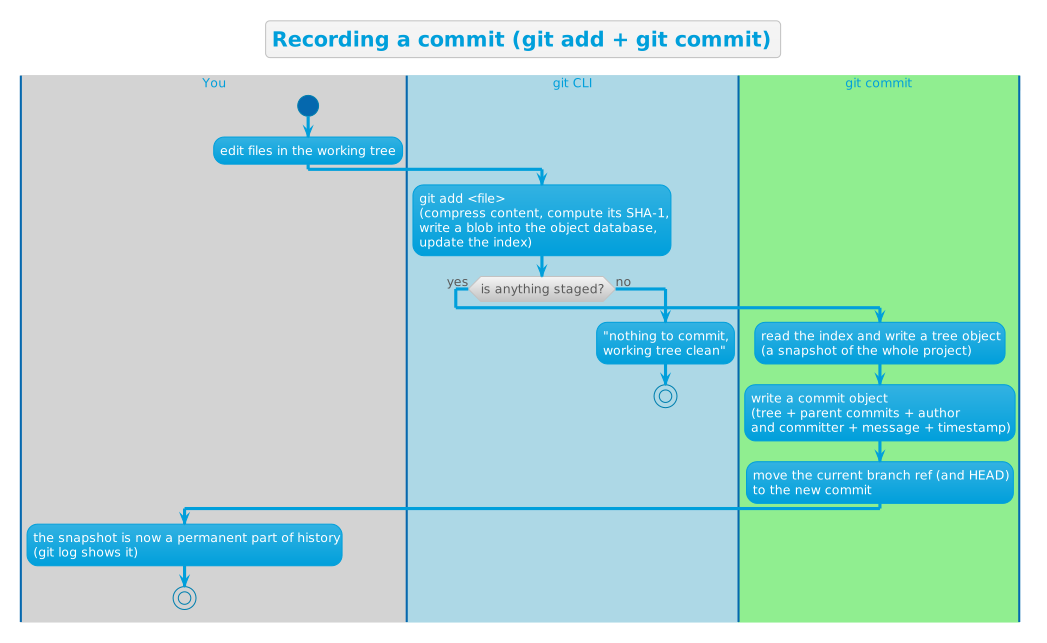
In detail:
- You modify files in the working tree.
git addtakes each changed file, compresses it, computes its SHA-1 and stores it as a blob in the object database; it then registers the file in the index. Nothing is yet part of history.git commitreads the index and writes a tree object — the full snapshot of the project at that moment — then a commit object that points at that tree, at the parent commit(s), and carries the author, committer, message and timestamp.- The current branch ref — and with it
HEAD— moves to the new commit. - The snapshot is now permanent:
git logshows it, and because the commit contains the tree and the tree contains the blobs, the entire snapshot is reachable and safe.
This is exactly what the plumbing commands do by hand: "You've just done the low-level operations to build up a Git history without using any of the front end commands. This is essentially what Git does when you run the git add and git commit commands — it stores blobs for the files that have changed, updates the index, writes out trees, and writes commit objects that reference the top-level trees and the commits that came immediately before them."[10]
Syncing with a remote
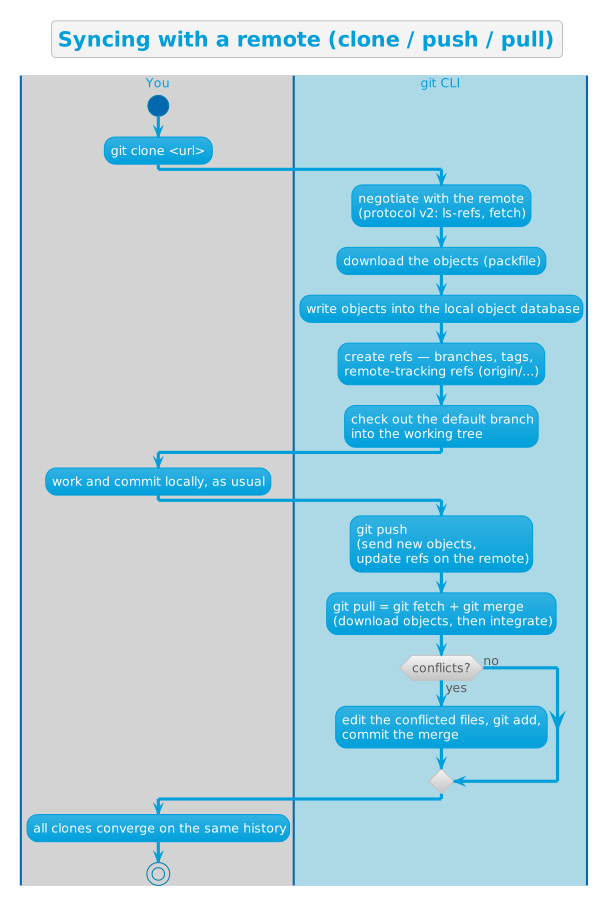
git clone <url>copies the whole repository — object database and refs — to your machine, sets up remote-tracking refs likeorigin/main, and checks out the default branch. Because every clone carries the full history, any clone can act as a backup, a fork, or a new remote.[4]git fetchdownloads objects and refs the remote has and you do not, without touching your working tree.git pullis fetch followed by integration (a merge, or a rebase if configured).[3]git pushuploads your new objects and asks the remote to update its refs. When both sides changed the same lines, the integration produces conflicts: Git writes both versions into the file with markers, and you resolve them by editing and committing.
Key design decisions
Snapshots, not differences
The founding decision, and the one that "makes Git reconsider almost every aspect of version control that most other systems copied from the previous generation": most VCSs store information as a set of files and the changes made to each file over time (delta-based version control); Git instead thinks of its data "more like a series of snapshots of a miniature filesystem". Every commit is a picture of all files at that moment. To stay efficient, "if files have not changed, Git doesn't store the file again, just a link to the previous identical file it has already stored".[4]
Nearly every operation is local
"Most operations in Git need only local files and resources to operate — generally no information is needed from another computer on your network." Because the entire history lives on your disk, browsing history, diffing old versions, committing and branching all work instantly and offline — on a plane, on a train, or with a broken VPN. Centralized systems cannot commit without the server; Git can.[4]
Integrity by content addressing
"Everything in Git is checksummed before it is stored and is then referred to by that checksum. This means it's impossible to change the contents of any file or directory without Git knowing about it." The checksum is the SHA-1 hash of the object's content (plus a small header), written as a 40-character hexadecimal string; Git stores everything in its database "not by file name but by the hash value of its contents".[4][10]
The weakness of SHA-1 (NIST deprecated it in 2011, and practical collision attacks appeared from 2015 on) is a known problem: Git 2.29 (October 19, 2020) added experimental support for the SHA-256 object format, explicitly noting "there is no interoperability between SHA-1 and SHA-256 repositories yet", and Git 3.0 is planned to make SHA-256 the default hash for new repositories.[8][7]
Branches are cheap pointers
A branch is not a copy of the tree, not a container of commits — it is just a ref, a pointer to a commit. Creating a branch writes a 41-byte file; switching branches only updates HEAD and the working tree. This makes branching and merging a first-class, everyday operation and delivers the original design goal of "strong support for non-linear development (thousands of parallel branches)".[3][5] Merging two lines of development is simply creating a commit with two parents.[3]
A three-part staging model
Git interposes the index between the working tree and the repository. Nothing is committed unless it is explicitly staged: git add moves changes into the index, git commit snapshots the index. The cost is one extra step compared with systems where any saved file is automatically versioned; the payoff is that a commit can contain exactly what you want it to contain — a surgical selection of changes across many files, reviewed with git diff --cached before it becomes history.[4]
Plumbing and porcelain
Git is built as a toolkit, not a monolith: a stable set of low-level plumbing commands that manipulate objects, the index and refs directly, with a thin porcelain layer of user-friendly commands on top. The plumbing interfaces are deliberately stable "because these commands are primarily for scripted use", while porcelain commands may change to improve the end-user experience. This design is what lets a huge ecosystem of GUIs, hosting services and tools build on Git without forking it.[3]
Git generally only adds data
"When you do actions in Git, nearly all of them only add data to the Git database. It is hard to get the system to do anything that is not undoable or to make it erase data in any way." Uncommitted work can be lost, but once a snapshot is committed — and especially once it is pushed to another repository — it is very difficult to lose. Because objects are immutable and content-addressed, nothing is ever overwritten: history only grows. This is what makes Git's rewriting commands (amend, rebase, reset) safe to use: they create new commits and move refs, never destroying the old ones until garbage collection reclaims them.[4]
Backward compatibility, broken deliberately
"The Git project aims to ensure backwards compatibility to the best extent possible. Minor releases will not break backwards compatibility unless there is a very strong reason to do so." But the project "irregularly releases breaking versions that deliberately break backwards compatibility", to stay "relevant, safe and maintainable going forward". So far there have been two: Git 1.6.0 (August 2008) and Git 2.0 (May 2014), with the numbering scheme changing from 1.major.minor to major.minor at 2.0. The next one, Git 3.0, is planned to change the default hash to SHA-256, the default reference storage to reftable, the default branch name to "main", and to require Rust in the build.[7]
Try it yourself
The web-based checks below were verified live on 2026-09-01; the local command outputs are reproduced from Git's official documentation (the Pro Git book[11] and the git manual), as marked.
# 1. Which version do you have?
git --version
Documented output (your version depends on your install):
git version 2.55.0
# 2. The very first commit of git.git, via the GitHub API (live check, 2026-09-01)
curl -s "https://api.github.com/repos/git/git/commits/e83c5163316f89bfbde7d9ab23ca2e25604af290" \
  | grep -E '"name"|"date"|"message"'
Output (verified live):
"name":"Linus Torvalds",
"date":"2005-04-07T22:13:13Z",
"name":"Linus Torvalds",
"date":"2005-04-07T22:13:13Z",
"message":"Initial revision of \"git\", the information manager from hell",
# 3. The latest feature release and its date, from the official website (live check, 2026-09-01)
curl -s https://git-scm.com/ | grep -oE "2\.55\.0|2026-06-29" | sort -u
Output (verified live):
2026-06-29
2.55.0
# 4. Git is a content-addressable store: hash some content, get back its key
echo 'test content' | git hash-object -w --stdin
Documented output:[10]
d670460b4b4aece5915caf5c68d12f560a9fe3e4
# 5. Read the object back by its key
git cat-file -p d670460b4b4aece5915caf5c68d12f560a9fe3e4
Documented output:
test content
# 6. Where did it go? Objects are stored under .git/objects, sharded by hash
find .git/objects -type f
Documented output:
.git/objects/d6/70460b4b4aece5915caf5c68d12f560a9fe3e4
# 7. A real project: init, add, commit, log
mkdir demo && cd demo
git init
Documented output (path depends on where you run it):
Initialized empty Git repository in /tmp/demo/.git/
echo "Hello, Git!" > README.md
git add README.md
git commit -m "first commit"
Documented output (hashes and authorship vary):
[master (root-commit) 6f1d2a3] first commit
 1 file changed, 1 insertion(+)
 create mode 100644 README.md
git log --oneline
Documented output:
6f1d2a3 (HEAD -> master) first commit
# 8. A commit object is just text: tree, author, committer, message
git cat-file -p HEAD
Documented output (hashes, identity and timestamps vary):[10]
tree d8329fc1cc938780ffdd9f94e0d364e0ea74f579
author Scott Chacon <schacon@gmail.com> 1243040974 -0700
committer Scott Chacon <schacon@gmail.com> 1243040974 -0700

First commit
Verification: outputs 2–3 were checked against the live GitHub API and git-scm.com on 2026-09-01; outputs 1 and 4–8 are reproduced from Git's official documentation — the Pro Git book chapters "What is Git?" and "Git Objects", and the git manual page.[10][4][3]
References
- ↑ ↑ Torvalds, L. (n.d.). Git (Website).
- ↑ ↑ ↑ Torvalds, L. (2005). Initial revision of "git", the information manager from hell (Webpage). In GitHub · Change is constant. GitHub keeps you ahead. (Website).
- ↑ ↑ ↑ ↑ ↑ ↑ ↑ ↑ ↑ ↑ ↑ ↑ ↑ ↑ Torvalds, L. (n.d.). git - the stupid content tracker (Webpage). In Git (Website).
- ↑ ↑ ↑ ↑ ↑ ↑ ↑ ↑ ↑ ↑ ↑ ↑ ↑ ↑ Chacon, S. (2014). What is Git? (Webpage). In Git (Website).
- ↑ ↑ ↑ Chacon, S. (2014). A Short History of Git (Webpage). In Git (Website).
- ↑ GitHub Inc. (n.d.). GitHub · Change is constant. GitHub keeps you ahead. (Website).
- ↑ ↑ ↑ ↑ ↑ Hamano, J. (n.d.). Git BreakingChanges Documentation (Webpage). In Git (Website).
- ↑ ↑ Hamano, J. (2020). Git 2.29 Release Notes (Webpage). In GitHub · Change is constant. GitHub keeps you ahead. (Website).
- ↑ GitHub Inc. (n.d.). The latest on Git updates (Webpage). In GitHub · Change is constant. GitHub keeps you ahead. (Website).
- ↑ ↑ ↑ ↑ ↑ ↑ Chacon, S. (2014). Git Objects (Webpage). In Git (Website).
- ↑ Chacon, S. (2014). Pro Git (Book). In Pro Git (Book) (p. 456). Apress.
Further reading
- Pro Git — the free book by Scott Chacon and Ben Straub, readable online
- Git Reference — official documentation, including the git manual and command pages
- Git documentation hub — book, videos, cheat sheet and references
- git/git — the source code repository
- Git BreakingChanges Documentation — past and planned breaking changes, including Git 3.0
- Git Glossary — the terminology, from "blob" to "reflog"