HowItWorks:Thunderbird: Difference between revisions
| Line 251: | Line 251: | ||
=== Community governance, corporate backing === | === Community governance, corporate backing === | ||
Thunderbird | The Thunderbird project has a unique community-corporate dual-structure. The '''Thunderbird Council''', elected by contributors since 2014, steers strategy and budget,<ref>{{#cite:Q1486}}</ref>where as MZLA Technologies Corporation , a '''for-profit subsidiary of the not-for-profit Mozilla Foundation''' created in 2020, manages day-to-day development and operations. This dual-structure ensures that while Thunderbird always remains a free and open-source community project, it is free to participate in commercial partnerships and offer optional paid services to finance development.<ref>{{#cite:Q1486}}</ref><ref>{{#cite:Q1487}}</ref> | ||
=== Stable, permission-gated dedicated APIs for add-ons === | === Stable, permission-gated dedicated APIs for add-ons === | ||
Revision as of 20:46, 1 September 2026
Explains how things actually work — part of our technology dissections collection.
Thunderbird is a free and open-source, cross-platform personal information manager, regrouping email, calendar, contacts, RSS feeds, chat and newsgroups in one application.
Thunderbird?
Thunderbird stands out as a personal information manager with three promises:[1]
- Privacy — "You are not the product." Thunderbird does not collect or sell user data, and users retain ownership of it.
- Freedom — Thunderbird is free and open-source software; its license, the Mozilla Public License 2.0, "ensures that it will remain free forever".
- Voice — anyone can get involved, and a contributor-elected council keeps Thunderbird "true to its values and mission".
Thunderbird runs on Windows, macOS and Linux.[2]
A short history
The history of Thunderbird is marked by four eventful time periods:
9 pre-releases and the 1.0 milestone (2003–2004)
The Thunderbird project was founded in 2003 by Mozilla Foundation under the leadership of Scott MacGregor, with the stated goal "to make communicating and collaborating better".[1]
The software went through 9 pre-releases (version 0.1-0.9), before reaching the 1.0 milestone at the end of 2004.[3]
According to the Mozilla foundation, a few key selling points makes Thunderbird 1.0 stand apart from contemporary alternatives:[2]
- Cross-platform availability: Thunderbird 1.0 works right out-of-box for Windows, Mac OS X and Linux;
- Adaptive junk mail controls: With a dynamic Bayesian filter learning from user action (marking and unmarking emails as spam), the more Thunderbird 1.0 is used, the more accurate its spam filtering becomes;
- High customisability: With built-in support for custom themes and extensions, user can personalise Thunderbird 1.0 to their taste and even add new functionalities;
- Easy migration: Sanctioned, guided built-in migration from Outlook, Eudora, and Netscape Communicator, the most popular commercial email clients at the time.
Transition to community stewardship(2012–2015)
On July 6, 2012, Mozilla chairman Mitchell Baker announced a new direction: Mozilla's leadership had concluded that "on-going stability is the most important thing" for Thunderbird and that "continued innovation in Thunderbird is not a priority for Mozilla's product efforts".[4] Mozilla would provide security updates through an Extended Support Release process, and the community could organize for ongoing development.[4]
The Thunderbird project later called the decision "both a blessing and curse": the community kept the project alive and contributed many features, but a volunteer-driven effort without a proper organization accumulated an inconsistent interface and mounting technical debt.[5]
In 2014, contributors established the Thunderbird Council, an elected body "functioning much like a board of directors for an open-source project": it oversees funds, approves budgets and shapes the product roadmap.[1]
In June 2015, Thunderbird 38 , released under the stewardship of the newly-elected Thunderbird Council, started shipping the calendar Lightening extension by default.[6]
Migration away from Mozilla infrastructure and creation of MZLA Technologies Corporation (2015–2020)
In late 2015, Mitchell Baker reopened a discussion about Thunderbird's future. According to him, Mozilla is happy to "disentangle the technical infrastructure" and assist the Thunderbird community, with the Mozilla Foundation serving as fiscal sponsor for donations.[7]
In 2017, on the advice of a report by Simon Phipps, former president of the OSI, comissioned by Mozilla, the Thunderbird Council announced that the Mozilla Foundation would remain the project's legal and fiscal home, but Thunderbird would migrate off Mozilla Corporation infrastructure and operate independently to continue serving its "over 25 million users" worldwide.[7]
In 2020, the project was transferred to MZLA Technologies Corporation, a new for-profit subsidiary fully-owned by the Mozilla Foundation. Cited reasons include easier recrutement, simpler governance, and possibilities to open commercial partnerships and offer paid services.[8] Essentially, the controversial move was justified as a necessary evil to ensure that Thunderbird remains financially sustainable as an open-source project.
Supernova rebuild, official Android support, and monthly releases (2023–2026)
In February 2023, the Thunderbird project announced plans for a ground-up rework with three objectives:[5]
1. make the code base leaner and remove technical debt; 2. rebuild the interface from scratch; 3. switch to a monthly release schedule.
Five months later, in July 2023, Thunderbird 115 "Supernova" shipped. Introducing a card view for the message list, a dynamic unified toolbar, a redesigned application menu, sortable folder modes, a tags view, and improving keyboard and screen-reader accessibility,[9], it is "a modernized overhaul of the software, both visually and technically".[9]." according to its release notice. Ryan Sipes, Thunderbird's Product and Business Development Manager, said the release marked "the beginning of a new era for Thunderbird".[9]
In October 2024, Thunderbird Android, developed from K-9 Mail, made its first stable release, further fulfilling the cross-platform promise of Thunderbird.[10]. As of September 2026, iOS is the only major operating system not yet officially supported by Thunderbird.
Today (2026-09), Thunderbird's release schedule has become extremely regular: one new major version every 4 weeks, and one Extended Support Release per year, typically in July.[11] Development of Thunderbird for iOS, described in the July 2026 progress report as the project's "first built from scratch" app, continues actively.[12]
Components and interactions
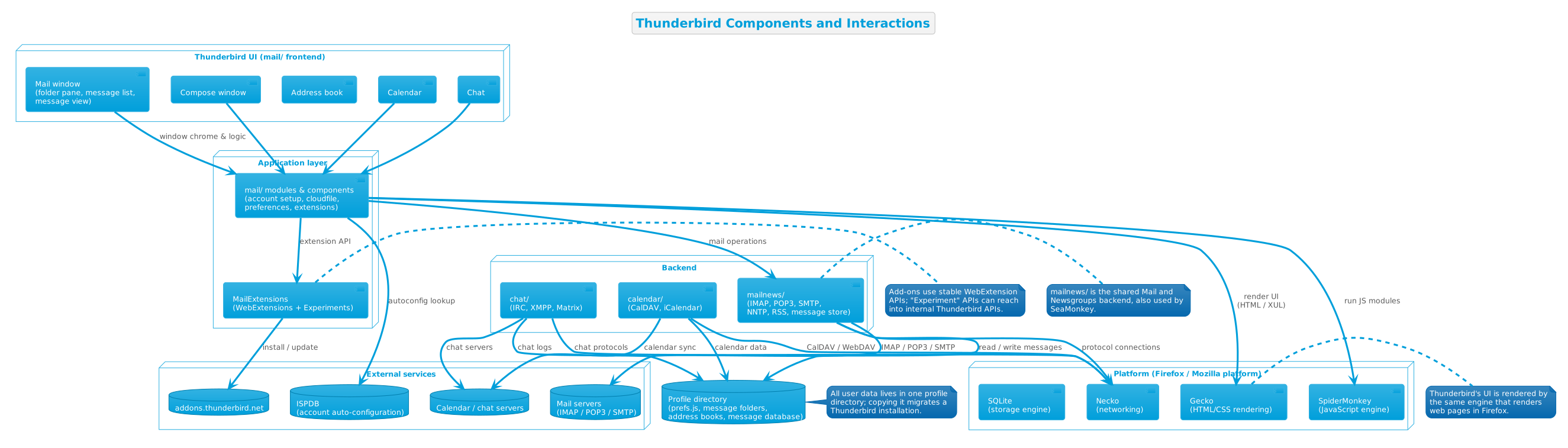
Written in C++, JavaScript, CSS and XHTML,[5] Thunderbird is built on the Mozilla platform. As the team describes it: "Thunderbird is literally a bunch of code running on top of Firefox. All the tabs and sections you see in our applications are just browser tabs with a custom user interface."[5] The Mozilla platform supplies multi-OS support, the Gecko web renderer, the SpiderMonkey JavaScript engine, as well as security patches and extension support from the Firefox release cycle..[5]
Source code organization
Thunderbird's source code repository is split into multiple sub-directories by functionality: [13]
- mail/ — the Thunderbird-specific frontend: user interface files, shared JavaScript modules, and components such as the account setup wizard, the address book front end, the composition window, the chat front end and the preferences tab.
- mailnews/ — "source code specific to the Mail and Newsgroups part of Thunderbird and SeaMonkey": the protocol and storage backend.
- calendar/ — the calendar component, formerly known as the Lightning extension.
- chat/ — the chat component, with one subdirectory per protocol; related code also lives in
mail/components/im. - build/, testing/, taskcluster/ and third_party/ — build, test and vendored-code infrastructure.
Addons
Since Thunderbird 78 (July 2020 release), all add-ons must be built within Thunderbird's MailExtension framework,[14] which uses regular WebExtension technology via standard JavaScript, CSS and HTML. They interact with Thunderbird through dedicated extensions APIs, which are generally stable across releases and subjected to user confirmation for access.[15]
Thunderbird in action
Account setup
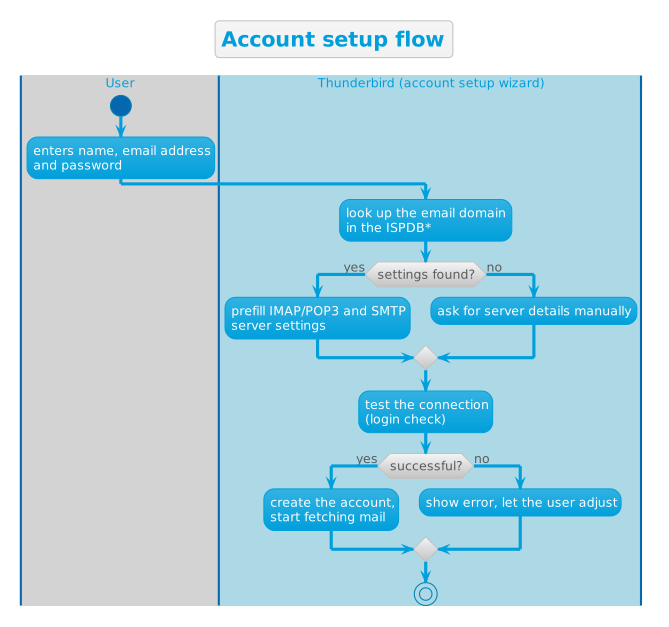
ISPDB is the acronym of the Internet Service Provider Database, Thunderbird's built-in, curated directory of email server settings of all known service providers with a user base of more than 0.1%. Thunderbird queries it during new account setup to auto-fill the incoming and outgoing server settings for user.[7]
The mail round trip
Key design decisions
Thunderbird rides on the Mozilla (Firefox) platform
Rather than building from scratch, developers chose to build Thunderbird on top of the Mozilla platform to benefit from its mature ecosystem.[5] This decision allows Thunderbird's relatively small team (~15 full-time equivalent) to focus on delivering core functionalities instead of reinventing the wheel.
Community governance, corporate backing
The Thunderbird project has a unique community-corporate dual-structure. The Thunderbird Council, elected by contributors since 2014, steers strategy and budget,[1]where as MZLA Technologies Corporation , a for-profit subsidiary of the not-for-profit Mozilla Foundation created in 2020, manages day-to-day development and operations. This dual-structure ensures that while Thunderbird always remains a free and open-source community project, it is free to participate in commercial partnerships and offer optional paid services to finance development.[1][8]
Stable, permission-gated dedicated APIs for add-ons
Thunderbird is built from day one to support extensions. Its extensibility has long been a core selling point. However, in older versions, add-ons broke with nearly every release, mostly due to backward incompatible API changes. To mitigate the issue, the project gradually phased in a dedicated MailExtensions framework based on standard WebExtensions technology, powered by stable, permission-gated APIs dedicated to add-ons since 2018.[15] In 2020, with the release of version 78, MailExtensions become the only sanctioned framework for Thunderbird extensions.[14]
A regular rapid release schedule
Since 2024, Thunderbird adopted Firefox's rapid release model: security and stability patches on demand, typically every two weeks; a new major version every 4 weeks; a new extended support release every year, typically in July.[11] The model ensures that new features can roll out rapidly to users without compromising long-term stability for users who value it.
Open protocols ensure maximum compatibility
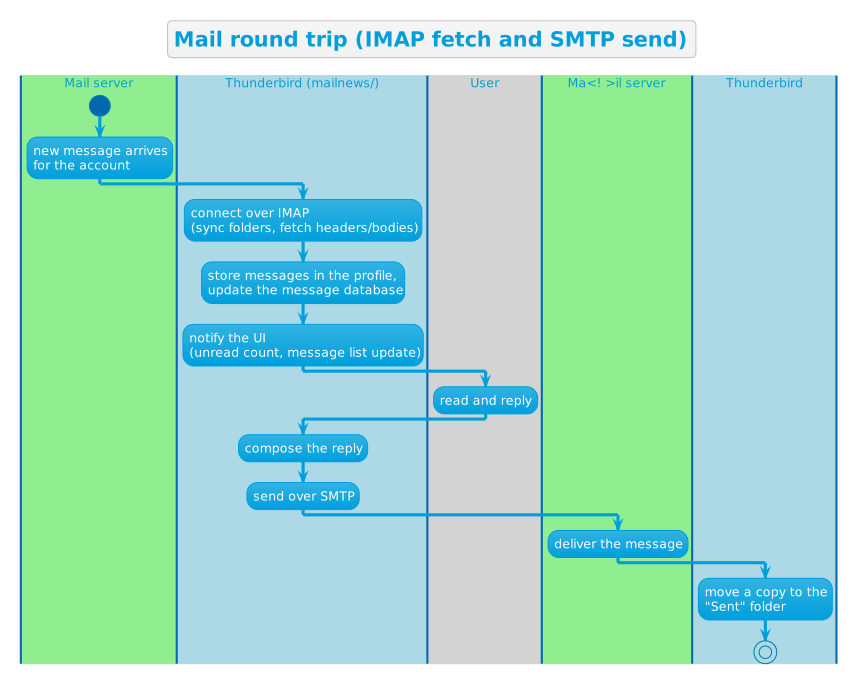
Thunderbird is built on open protocols: IMAP, POP3, and SMTP for emails, NNTP and RSS for live feed, CalDAV and iCalendar for calendar, and IRC, XMPP, and Matrix for chat ,[2][13] making it compatible with any service provider supporting the same open protocols.
Uncompromised privacy
Thunderbird's privacy stance is uncompromising: "You are not the product". It does not collect user data beyond anonymous usage statistics, and user can opt out at any time.[1] This stance, although logically not profitable, earned Thunderbird a solid reputation among privacy-conscious users.
A single profile directory facilitates migration
All of Thunderbird's data, preferences, mail folders, address books, and the message database, live in a single profile directory, which, on Linux, is ~/.thunderbird. As such, migration to a new machine is as simple as copying the profile directory to the equivalent location on the new machine[8]
Try it yourself
Commands verified live on 2026-09-01.
Example command syntax is based on Linux bash. Windows command syntax is different.
# What is the latest stable release right now?
curl -s https://product-details.mozilla.org/1.0/thunderbird_versions.json
Output on 2026-09-01:
{
    "LATEST_THUNDERBIRD_ALPHA_VERSION": "54.0a2",
    "LATEST_THUNDERBIRD_DEVEL_VERSION": "156.0b1",
    "LATEST_THUNDERBIRD_NIGHTLY_VERSION": "157.0a1",
    "LATEST_THUNDERBIRD_VERSION": "154.0",
    "THUNDERBIRD_ESR": "140.14.1esr",
    "THUNDERBIRD_ESR_NEXT": "153.1.1esr"
}
Install the official Flatpak packaged and maintained by the Thunderbird team:[9]
# Install from Flathub
flatpak install flathub org.mozilla.Thunderbird
# Launch it
flatpak run org.mozilla.Thunderbird
Or use your distribution's package, which may be somewhat outdated:
# Debian / Ubuntu
sudo apt install thunderbird
References
- ↑ ↑ ↑ ↑ ↑ ↑ MZLA Technologies Corporation. (n.d.). Who We Are (Webpage). In Thunderbird (Website).
- ↑ ↑ ↑ ↑ Mozilla Foundation. (2004). Mozilla Thunderbird 1.0 email client has landed (Webpage). In Mozilla Press Center (Website).
- ↑ MZLA Technologies Corporation. (n.d.). Thunderbird Releases (Webpage). In Thunderbird (Website).
- ↑ ↑ Baker, M. (2012). Thunderbird: Stability and Community Innovation (Webpage). In Mitchell Baker’s Blog (Website).
- ↑ ↑ ↑ ↑ ↑ ↑ Castellani, A. (2023). Why We’re Rebuilding The Thunderbird Interface From Scratch (Webpage). In Thunderbird Blog (Website).
- ↑ James, K. (2015). Thunderbird 38 Released (Webpage). In Thunderbird Blog (Website).
- ↑ ↑ ↑ Kewisch, P. (2017). Thunderbird’s Future Home (Webpage). In Thunderbird Blog (Website).
- ↑ ↑ ↑ Kewisch, P. (2020). Thunderbird’s New Home (Webpage). In Thunderbird Blog (Website).
- ↑ ↑ ↑ ↑ Evangelho, J. (2023). Our Fastest, Most Beautiful Release Ever: Thunderbird 115 "Supernova" Is Here! (Webpage). In Thunderbird Blog (Website).
- ↑ Kewisch, P. (2024). Thunderbird for Android 8.0 Takes Flight (Webpage). In Thunderbird Blog (Website).
- ↑ ↑ MZLA Technologies Corporation. (n.d.). Release Cadence (Webpage). In Thunderbird Developer Documentation (Website).
- ↑ MZLA Technologies Corporation. (2026). Mobile Progress Report: July 2026 (Webpage). In Thunderbird Blog (Website).
- ↑ ↑ MZLA Technologies Corporation. (n.d.). Codebase Overview (Webpage). In Thunderbird Developer Documentation (Website).
- ↑ ↑ MZLA Technologies Corporation. (2020). Thunderbird 78.0 Release Notes (Webpage). In Thunderbird (Website).
- ↑ ↑ MZLA Technologies Corporation. (n.d.). About Add-ons (Webpage). In Thunderbird Developer Documentation (Website).
Further reading
- Thunderbird — the official website
- The Thunderbird Blog — release announcements and project news
- Thunderbird Developer Documentation — architecture, building, add-ons
- comm-central — the source repository
- Thunderbird release notes
- Thunderbird support (SUMO)
- Thunderbird roadmaps
- Get involved