HowItWorks:Git
Explains how things actually work — part of our technology dissections collection.
Git is a free and open source distributed version control system, designed to handle projects of any size with speed and efficiency.[1] Written in C and released under the GNU General Public License v2, it was created by Linus Torvalds in April 2005 to manage the Linux kernel source code, and is today maintained by Junio C. Hamano.[2][3]
Git, a distributed version control system
A version control system (VCS) records changes to a set of files over time, so that any past version can be recalled later. Without one, a project is just a folder of files that only moves forward: a wrong edit cannot be undone, and two people editing the same files quickly overwrite each other.
Most older systems — CVS, Subversion, Perforce — are centralized: one server holds the canonical repository, and anything that needs history must travel over the network to that server. In contrast, Git is distributed: every clone of a repository is a complete repository with the entire history, so nearly every operation can be done locally, without a network connection.[4]
Git functions by storing multiple versions of each tracked file, classified into three states:
- Committed: immutable, permanent snapshots in the project's history, made when user calls
git commit. Git stores those snapshots in its object database in the Git directory (normally.git/), alongside the project metadata. When you clone a repository, this is what gets copied.[4] User can recall any snapshot later withgit checkoutorgit switch. - Modified: This is the on-disk version of a file. Any changes since the last commit are stored in a working tree[4]
- Staged: A temporary snapshot of a modified file made when user called
git addon the file. Technically named the "index", it becomes a new immutable, permanent snapshot (commit) when user gives Git the go-ahead by calling thegit commitcommand.[4]
Those different versions of the same file becomes the base of the Git history, a permanent record of changes made to files in a project. Via various commands, users can search it, revert the project to a particular state, or even cherry-pick certain changes on top of each other in a desired order on top of a base state to make a new state. Furthermore, users can even create parallel sub-tracks in the Git history via branches to allow the project to simultaneously evolve in different directions, temporarily or permanently, facilitating multi-user collaboration.[4]
As of 2026, Git is effectively THE standard for version control in software development.[3]
A short history
Git was born out of the needs of the Linux kernel project.[5]
In the early days of Linux, from 1991 to 2002, kernel changes were passed around as patches and archived files, which worked fine as the number of contributors is relatively low.
Around 2002, as the number of developers increased, this spontaneous, haphazard system started to break down. It became increasingly cumbersome to keep everyone on the same page. A version control system, became therefore a necessity. BitKeeper, a proprietary distributed version control system, was offered free-of-charge to the Linux kernel project and was adopted.[5]
In 2005, the relationship between the kernel community and BitMover Inc., the company that owns BitKeeper, broke down. BitMover Inc., citing a violation of its license terms, revoked the Linux kernel project's free-of-charge access to BitKeeper. Rather than making concessions to negotiate a new term of access with BitMover Inc., the Linux development community — in particular Linus Torvalds, the creator of Linux, decided to build their own better, more efficient version-control tool based on the lessons learned from BitKeeper. The stated goals of the new system was ambitious: speed; simple design; strong support for non-linear development (thousands of parallel branches); fully distributed; and able to handle large projects like the Linux kernel efficiently.[5]
On April 7, 2005, after about 10 days of devoted development, Torvalds made the first commit to the new system — commit e83c5163 — with the self-deprecating message "Initial revision of 'git', the information manager from hell".[2] The name 'git' itself is a joke: it is a British slang for an unpleasant person. According to the README included in that very first commit, "it can mean anything, depending on your mood": "global information tracker" when you are in a good mood, and "goddamn idiotic truckload of sh*t" when it breaks.[2]
Later in 2005, to reconcentrate himself on Linux kernel development, Torvalds handed the project over to Junio C. Hamano, who has maintained it ever since.[3]
In May 2014, Git 2.0, which carried large backward-incompatible changes, was released[6]
In 2020, Git 2.29 introduced experimental support for the SHA-256 object format alongside the long-standing SHA-1.[7]
As of September 2026, the project is preparing for Git 3.0, a breaking release that plans to make SHA-256 the default hash function for new repositories, switch the default reference storage to the reftable format, adopt "main" as the default branch name, and make Rust a mandatory part of the build.[6]
Components and interactions
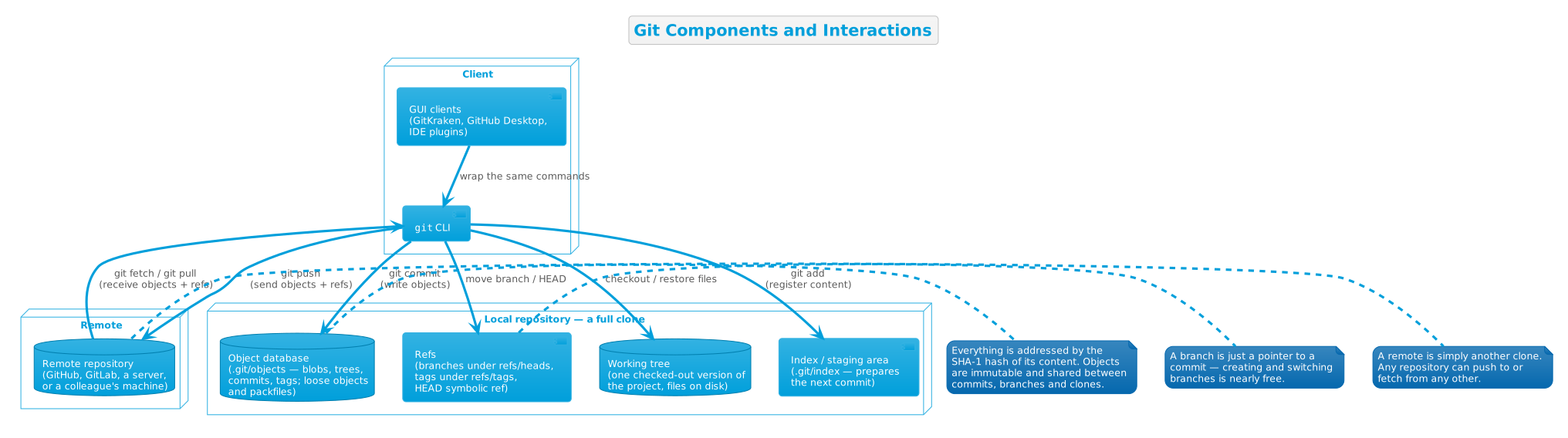
A Git repository consists usually of a working directory with a .git subdirectory at the top level.
The .git directory contains, among other things, a compressed object database representing the complete history of the project, an index file that links that history to the current contents of the working tree, and named pointers into that history — tags and branch heads.[3]
Git in action
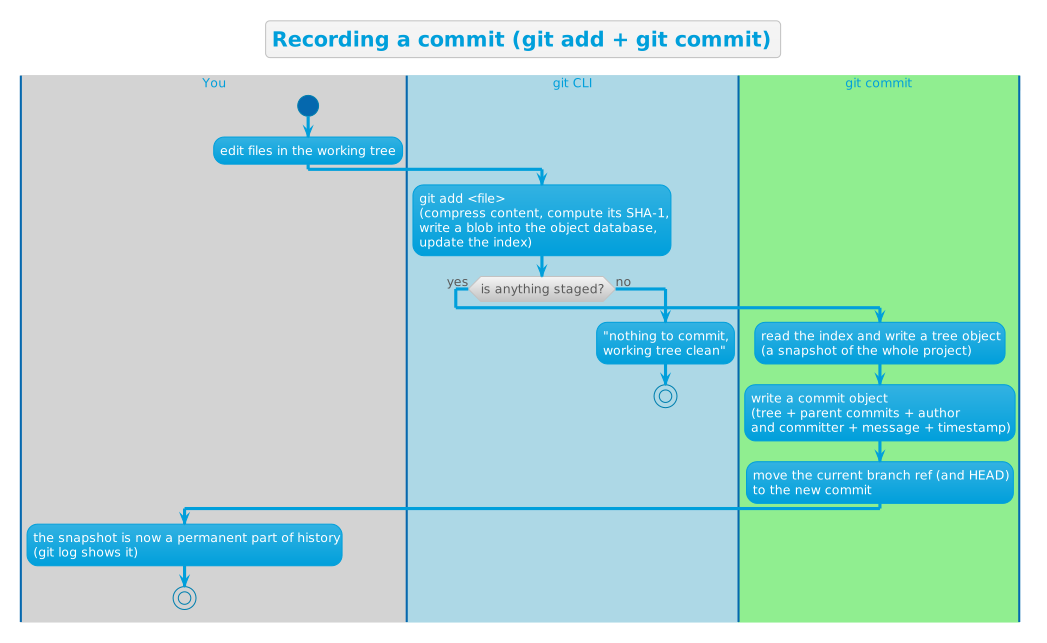
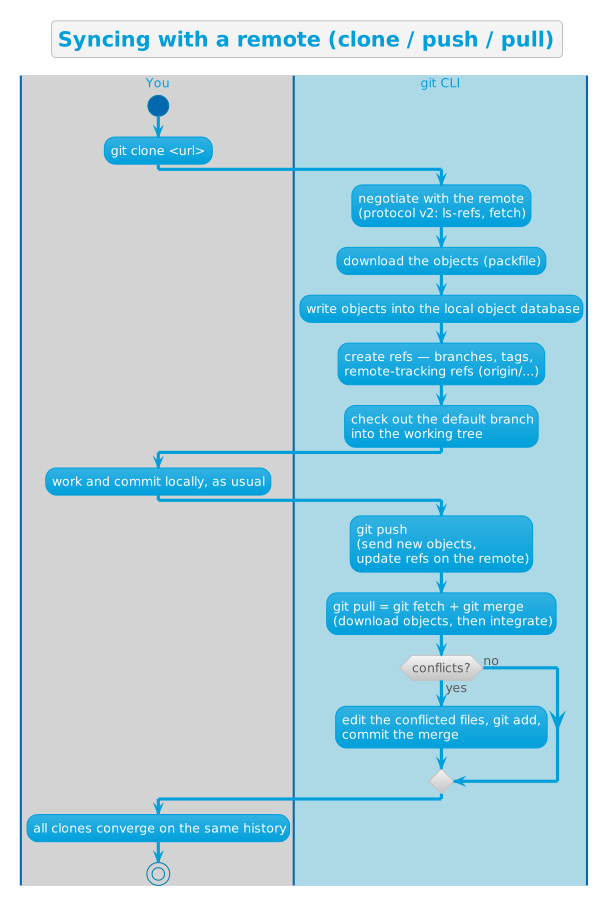
Two flows cover most of everyday Git: recording a commit (the snapshot machine) and syncing with a remote (the distributed part).
Recording a commit
Syncing with a remote
Key design decisions
Snapshots, not differences
The radical difference between Git and earlier version control systems is that instead of storing commits as deltas (changes made in comparison to previous version), Git stores commits as snapshots: exact state of changed files at commit time.[4]
This snapshot approach is robust: unlike in delta-based version control systems, corruption of a commit state would not propagate to all newer commits based on that commit.
What's more, this approach also renders large rollbacks trivial: rolling back to the state of any commit, even those from 5 years ago, consists of a simple object database query to pull up a particular snapshot, and not mathematically computing the desired state by reverting all new deltas from the latest state.
Nearly every operation is local
Another important difference between Git and earlier version-control systems is that most operations can be completed locally.
While most earlier systems rely on the central, authoritative "bookkeeping" server for almost every operation, Git is distributed. Each repository clone contains the entire Git history, which means most git operations, like browsing and diffing old versions, committing and branching all work instantly and offline. Syncing with a server is entirely optional. [4]
This distributed design made Git extremely suitable for large Opensource projects with thousands of contributors. The load on the central "bookkeeping" server is minimal: contributors call git clone to copy the repository to their local machine once, then everything happens locally on their machine, until they have arrived at something meaningful to be shared back with the entire community, at which point they call git push to sync back their changes to the central server.
Storage by hash value, not file name
Git stores everything in its database by the hash value of its contents, not file name.[4][8]
This design offers multiple benefits:
- Guaranteed integrity: Any corruption to a file's content becomes immediately obvious to Git at retrieval time: the hash value simply would not match.
- Safe indefinite caching: A cached version of any file never becomes silently stale. Git can instantly verify its freshness by comparing the hash value to the latest version.
- Zero-cost file renaming: When user renames a file (e.g., from README to README.md), the hash value, which is calculated uniquely based on a file's content, stays constant. Therefore, no change is needed in Git's object storage when a file is renamed.
Branches are cheap pointers
A branch is not a copy of the Git tree nor a container of commits — it is just a thin ref, a 41-byte pointer to a commit. Therefore, creating and merging branches cost next-to-nothing, delivering the original design goal of "strong support for non-linear development (thousands of parallel branches)".[3][5][3]
A three-part staging model
Git interposes the index between the working tree and the repository. Nothing is committed unless it is explicitly staged: git add moves changes into the index, git commit snapshots the index. The cost is one extra step compared with systems where any saved file is automatically versioned; the payoff is that a commit can contain exactly what you want it to contain — a surgical selection of changes across many files, reviewed with git diff --cached before it becomes history.[4]
Plumbing and porcelain
Git is built as a toolkit, not a monolith: a stable set of low-level plumbing commands that manipulate objects, the index and refs directly, with a thin porcelain layer of user-friendly commands on top. The plumbing interfaces are deliberately stable "because these commands are primarily for scripted use", while porcelain commands may change to improve the end-user experience. This design is what lets a huge ecosystem of GUIs, hosting services and tools build on Git without forking it.[3]
Git generally only adds data
"When you do actions in Git, nearly all of them only add data to the Git database. It is hard to get the system to do anything that is not undoable or to make it erase data in any way." Uncommitted work can be lost, but once a snapshot is committed — and especially once it is pushed to another repository — it is very difficult to lose. Because objects are immutable and content-addressed, nothing is ever overwritten: history only grows. This is what makes Git's rewriting commands (amend, rebase, reset) safe to use: they create new commits and move refs, never destroying the old ones until garbage collection reclaims them.[4]
Backward compatibility, broken deliberately
"The Git project aims to ensure backwards compatibility to the best extent possible. Minor releases will not break backwards compatibility unless there is a very strong reason to do so." But the project "irregularly releases breaking versions that deliberately break backwards compatibility", to stay "relevant, safe and maintainable going forward". So far there have been two: Git 1.6.0 (August 2008) and Git 2.0 (May 2014), with the numbering scheme changing from 1.major.minor to major.minor at 2.0. The next one, Git 3.0, is planned to change the default hash to SHA-256, the default reference storage to reftable, the default branch name to "main", and to require Rust in the build.[6]
Try it yourself
The web-based checks below were verified live on 2026-09-01; the local command outputs are reproduced from Git's official documentation (the Pro Git book[9] and the git manual), as marked.
# 1. Which version do you have?
git --version
Documented output (your version depends on your install):
git version 2.55.0
# 2. The very first commit of git.git, via the GitHub API (live check, 2026-09-01)
curl -s "https://api.github.com/repos/git/git/commits/e83c5163316f89bfbde7d9ab23ca2e25604af290" \
  | grep -E '"name"|"date"|"message"'
Output (verified live):
"name":"Linus Torvalds",
"date":"2005-04-07T22:13:13Z",
"name":"Linus Torvalds",
"date":"2005-04-07T22:13:13Z",
"message":"Initial revision of \"git\", the information manager from hell",
# 3. The latest feature release and its date, from the official website (live check, 2026-09-01)
curl -s https://git-scm.com/ | grep -oE "2\.55\.0|2026-06-29" | sort -u
Output (verified live):
2026-06-29
2.55.0
# 4. Git is a content-addressable store: hash some content, get back its key
echo 'test content' | git hash-object -w --stdin
Documented output:[8]
d670460b4b4aece5915caf5c68d12f560a9fe3e4
# 5. Read the object back by its key
git cat-file -p d670460b4b4aece5915caf5c68d12f560a9fe3e4
Documented output:
test content
# 6. Where did it go? Objects are stored under .git/objects, sharded by hash
find .git/objects -type f
Documented output:
.git/objects/d6/70460b4b4aece5915caf5c68d12f560a9fe3e4
# 7. A real project: init, add, commit, log
mkdir demo && cd demo
git init
Documented output (path depends on where you run it):
Initialized empty Git repository in /tmp/demo/.git/
echo "Hello, Git!" > README.md
git add README.md
git commit -m "first commit"
Documented output (hashes and authorship vary):
[master (root-commit) 6f1d2a3] first commit
 1 file changed, 1 insertion(+)
 create mode 100644 README.md
git log --oneline
Documented output:
6f1d2a3 (HEAD -> master) first commit
# 8. A commit object is just text: tree, author, committer, message
git cat-file -p HEAD
Documented output (hashes, identity and timestamps vary):[8]
tree d8329fc1cc938780ffdd9f94e0d364e0ea74f579
author Scott Chacon <schacon@gmail.com> 1243040974 -0700
committer Scott Chacon <schacon@gmail.com> 1243040974 -0700

First commit
Verification: outputs 2–3 were checked against the live GitHub API and git-scm.com on 2026-09-01; outputs 1 and 4–8 are reproduced from Git's official documentation — the Pro Git book chapters "What is Git?" and "Git Objects", and the git manual page.[8][4][3]
References
- ↑ Torvalds, L. (n.d.). Git (Website).
- ↑ ↑ ↑ Torvalds, L. (2005). Initial revision of "git", the information manager from hell (Webpage). In GitHub · Change is constant. GitHub keeps you ahead. (Website).
- ↑ ↑ ↑ ↑ ↑ ↑ ↑ ↑ Torvalds, L. (n.d.). git - the stupid content tracker (Webpage). In Git (Website).
- ↑ ↑ ↑ ↑ ↑ ↑ ↑ ↑ ↑ ↑ ↑ Chacon, S. (2014). What is Git? (Webpage). In Git (Website).
- ↑ ↑ ↑ ↑ Chacon, S. (2014). A Short History of Git (Webpage). In Git (Website).
- ↑ ↑ ↑ Hamano, J. (n.d.). Git BreakingChanges Documentation (Webpage). In Git (Website).
- ↑ Hamano, J. (2020). Git 2.29 Release Notes (Webpage). In GitHub · Change is constant. GitHub keeps you ahead. (Website).
- ↑ ↑ ↑ ↑ ↑ Chacon, S. (2014). Git Objects (Webpage). In Git (Website).
- ↑ Chacon, S. (2014). Pro Git (Book). In Pro Git (Book) (p. 456). Apress.
Further reading
- Pro Git — the free book by Scott Chacon and Ben Straub, readable online
- Git Reference — official documentation, including the git manual and command pages
- Git documentation hub — book, videos, cheat sheet and references
- git/git — the source code repository
- Git BreakingChanges Documentation — past and planned breaking changes, including Git 3.0
- Git Glossary — the terminology, from "blob" to "reflog"