HowItWorks:Docker
Explains how things actually work — part of our technology dissections collection.
Written in Go and built on top of Linux kernel,Docker packages an application — code, runtime, libraries, configuration — into a container: a loosely isolated environment that runs the same on any device: on a developer's laptop like on a data centre server[1] [1].
Container ?
A container is an isolated, self-sufficient process without external dependencies. It contains all the files it needs to run, making it extremely portable.[2]
Programmatically independent but sharing the host's kernel, a Docker container offers the full isolation provided by Virtual Machines (VM) at a fraction of the resource overhead.[2]
A short history
Docker was first pioneered by Solomon Hykes, founder of dotCloud, as an internal project to solve virtualisation bottlenecks for his company's PaaS service.
In March 2013, it was decided to open-source the project, so, as Hykes himself described, that "pioneers can start to use containers and collaborate in a monolithic open source codebase: Docker".[3]
The opensourced Docker became an instant hit. By October 2013, seven months after the project's first open-source pre-release, Docker was downloaded more than 140,000 times, and forked more than 800 times on Github.[4] It was so popular that dotCloud decided to rename itself Docker, Inc.[5]
Docker 1.0, the first production-ready release, shipped on June 9, 2014.[6]
In 2015, Docker's container format and runtime became the cornerstone of the newly written open standards for containers under the Open Container Initiative (OCI) led by the Linux Foundation.[7].
In 2016, the core container runtime of Docker was spun out into a standalone project called containerd and donated to the Cloud Native Computing Foundation (CNCF).[8][9]
In 2017, the Moby Project was launched to host all open-source collaboration around Docker.[3] It aims to provide "an open framework to assemble specialized container systems without reinventing the wheel".[10]
As of August 2026, the Moby project's Github repo has more than 2330 contributors, and 19.2k forks.[11]
Components and interactions
Docker uses a client-server architecture: the Docker client talks to the Docker daemon (dockerd), which does "the heavy lifting of building, running, and distributing" containers, over a REST API on a UNIX socket or network interface.[1] The daemon manages Docker objects — images, containers, networks, volumes, plugins — and can even communicate with other daemons (for Docker services).[1] Another client, besides the CLI, is Docker Compose, for multi-container applications.[1]
Modern Docker Engine is not one monolith but a stack of cooperating components:
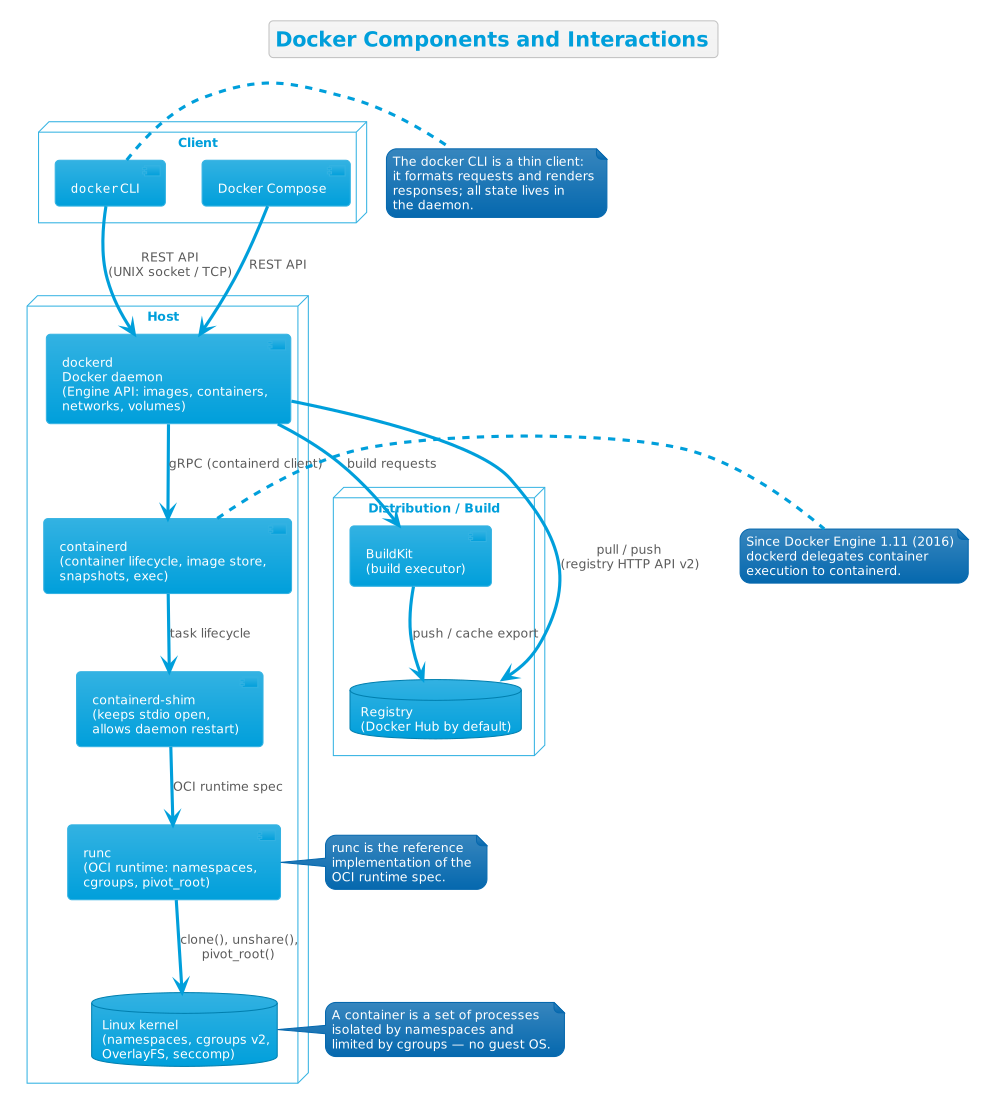
The responsibilities are split roughly as follows:
- dockerd — the API server and object manager. It receives every request, holds the state of images/containers/networks/volumes, and orchestrates the rest of the stack.[1]
- containerd — "an industry-standard container runtime", a daemon that "manages the complete container lifecycle of its host system, from image transfer and storage to container execution and supervision to low-level storage to network attachments and beyond".[9] Since Docker Engine 29, the containerd image store is the default for fresh installs.[12]
- runc — the OCI runtime that actually creates and runs container processes, applying namespaces, cgroups and filesystem isolation; it is the reference implementation of the OCI runtime specification.[7]
- containerd-shim — the small per-container process that keeps the container's stdio open and lets the daemons restart without killing containers.
- The Linux kernel — the isolation primitives themselves: namespaces (each container gets its own set), cgroups for resource limits, OverlayFS for layered filesystems, seccomp and capabilities for security.[1]
- A registry — stores and distributes images; Docker Hub is the default, and
docker pull/docker runfetch from it whiledocker pushuploads to it.[1] - BuildKit — the builder backend that executes image builds; since its adoption it is "the default builder for Docker Desktop and Docker Engine users".[13]
Docker in action
Two flows cover most of what Docker does: building an image from a Dockerfile, and running a container from an image.
Image build
To build your own image you write a Dockerfile, "a text document that contains all the commands a user could call on the command line to assemble an image".[14] Each instruction — FROM, RUN, COPY, CMD, ENTRYPOINT, ... — becomes a layer of the image.[1] Because layers are immutable and cached, "when you change the Dockerfile and rebuild the image, only those layers which have changed are rebuilt" — the main reason images are so lightweight and builds so fast compared with other virtualization technologies.[1]
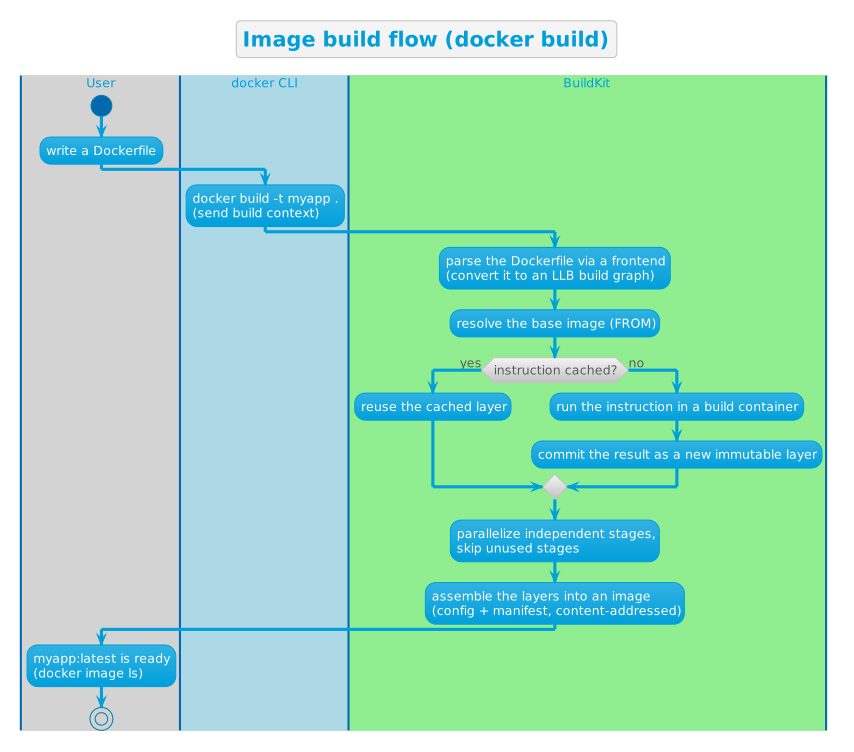
Underneath the classic docker build command sits BuildKit. Its core is a Low-Level Build (LLB) format: "a content-addressable dependency graph" that lets it detect and skip unused build stages, run independent stages in parallel, and transfer only the changed files of the build context.[13] A "frontend" — itself distributed as an image — turns the human-readable Dockerfile into LLB, so the Dockerfile language can evolve without rebuilding the engine.[13]
Container run
A container is "a runnable instance of an image", "defined by its image as well as any configuration options you provide to it when you create or start it".[1] When you run docker run -i -t ubuntu /bin/bash, the documented sequence is:[1]
- If the
ubuntuimage is not present locally, Docker pulls it from the configured registry. - Docker creates a new container (as with
docker container create). - Docker allocates a read-write filesystem to the container as its final layer — the only layer a running container may write to.
- Docker creates a network interface connecting the container to the default network and assigns it an IP address.
- Docker starts the container and executes
/bin/bash, attached to your terminal. - When you type
exit, the container stops but is not removed — you can start it again or delete it.
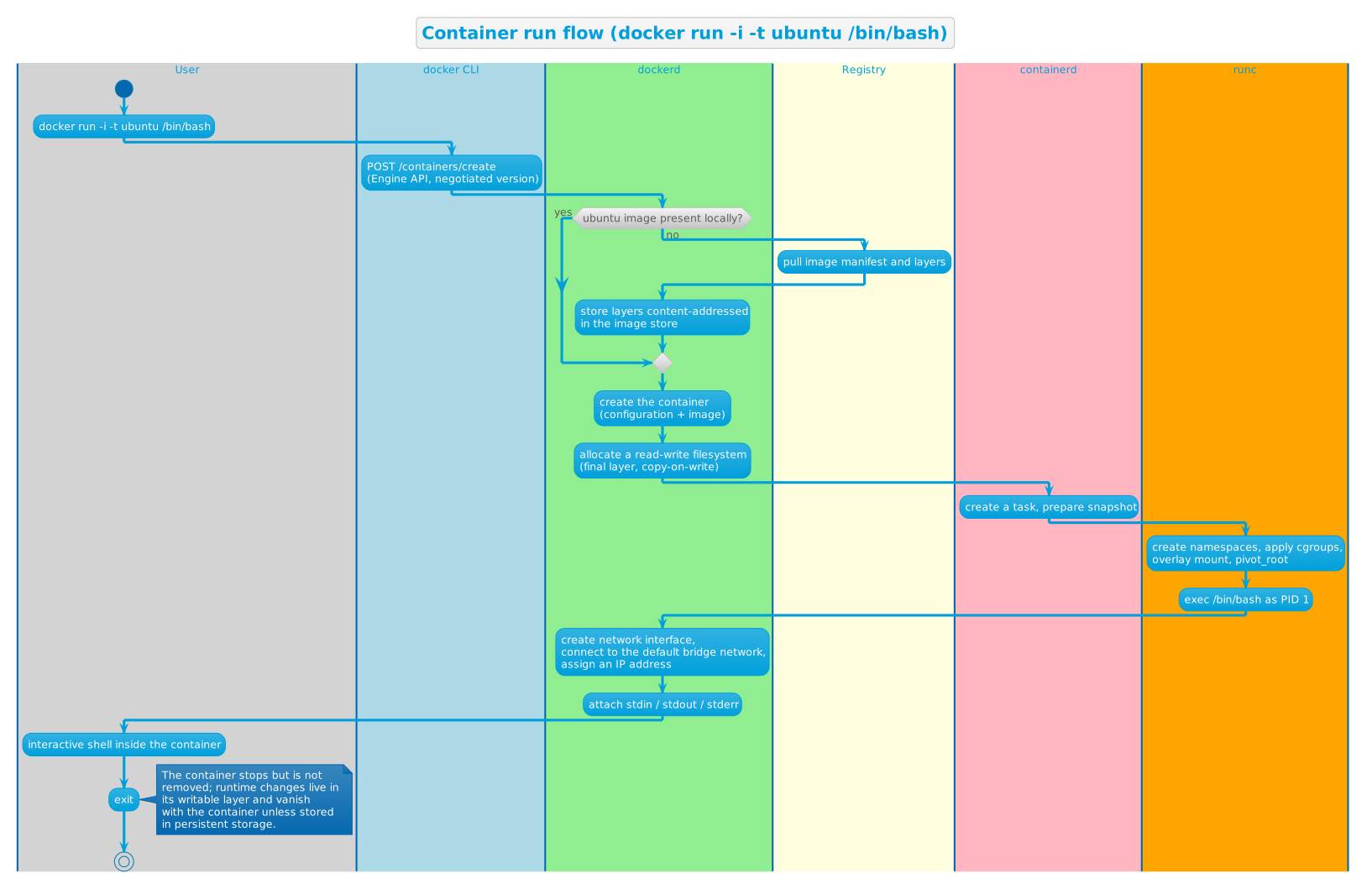
That last point is important: "when a container is removed, any changes to its state that aren't stored in persistent storage disappear."[1] Data that must survive goes into volumes or bind mounts; ephemeral state simply dies with the container.
Key design decisions
Containers share the host kernel
The founding decision: a container is not a mini-VM. Docker uses Linux namespaces to give each container an isolated view (processes, networking, filesystem, users, and more), and cgroups to limit CPU, memory and I/O.[1] Because every container on a host shares the same kernel, there is no guest OS to boot, so containers start in seconds and many more fit on a machine than VMs would.[2]
The trade-off is architectural: isolation is as good as the kernel's — and the admin's — configuration. Docker historically defaulted to cgroups v1; the ecosystem has since moved to cgroups v2, and as of Docker Engine 29 cgroup v1 is deprecated but supported until at least May 2029.[12] On macOS and Windows, Docker Desktop bundles the daemon, the client, Docker Compose, Kubernetes and more, so the same Linux-based engine is available everywhere.[1]
Images are immutable, layered and content-addressed
An image is a "read-only template", often "based on other images, with some additional customization" — e.g. the Ubuntu image plus the Apache web server plus your application.[1][15].
As most consumer images are a combination of base images with customisation, they can be considered as the sum of multiple layers. Docker identifies them by a hash of their content, and identical layers are shared between images via content-addressable storage, which means they are only downloaded and stored once, regardless of the number of consumer images.[15]
- Union filesystems — at run time, layers are stacked into a single unified view; the container's root is set to that view with
chroot. On top of the read-only image layers, a directory is created for the running container, so the container writes without ever touching the image. For additional robustness, Docker uses copy-on-write. [15]
This design ensures that images are always state-consistent and optimised for network distribution and storage.
The Dockerfile is a declarative build recipe
Rather than mutating a running machine (and hoping the result is reproducible), Docker builds images from a declarative Dockerfile — "all the commands a user could call on the command line to assemble an image".[14] A valid Dockerfile must start with FROM, which "initializes a new build stage and sets the base image".[14] The key instructions:
RUN— "execute any commands to create a new layer on top of the current image".[14]COPY/ADD— copy files from the build context (or another stage) into the image.CMD/ENTRYPOINT— define the command executed when a container starts;ENTRYPOINTconfigures the container to run "as an executable",CMDprovides default arguments.[14]- Multiple
FROMlines enable multi-stage builds — build in one stage, copy only the artifacts into a minimal final stage.[14]
Because each instruction is a layer, the instruction sequence is also the cache key: RUN layers are reused on rebuild unless invalidated — a changed COPY or ADD invalidates the cache — so instructions placed early in the file are the ones that get reused across builds.[14] BuildKit hardened this model by tracking "the checksums of build graphs" instead of heuristics, making the cache faster, more precise and portable — it can even be exported to a registry.[13]
A daemon-centric client-server design
Docker uses a single privileged daemon that owns all state, fronted by a deliberately thin CLI.[1] Every docker command is a REST call to the Engine API; the daemon performs it and reports back.[1] This concentrates complexity in one place, enforcing the object model and facilitating security auditing. It also makes the engine highly scriptable — CI systems, orchestrators and tools like Compose and Docker Desktop all call the daemon's API.[1]
A logical downside of this complexity concentration is a long-lived server process as a single point of failure. To mitigate the risk, the daemon behaves a bit like a manager: it does not handle low-level container lifecycle itself but instead delegates them to containerd. This way, in case of state corruption the daemon can restart without killing containers, a bit like how a manager can go for a short refresher while ground workers continue to function normally.
The Engine API is versioned and stable
Like MediaWiki's parser stability, Docker's contract with the outside world is its versioned Engine API. Clients and daemons negotiate the API version, so a newer CLI can drive an older daemon and vice versa. Docker Engine 29 keeps this discipline hard: the daemon now requires API version v1.44 or later, and the client dropped support for negotiating versions below v1.44 — old enough that tooling has years of runway to migrate.[12] Breaking changes are announced in the release notes and take effect per API version, not per install.[12]
Standardize the primitives, assemble the rest
The most consequential decision is arguably the unbundling. Rather than keeping the whole stack proprietary to Docker, the low-level pieces became open standards and neutral projects:
- OCI (2015) — runtime, image and distribution specifications, with Docker's runc as the reference runtime. Any OCI-compliant engine can run OCI images; that is why
docker pullimages run under other runtimes.[7] - containerd (2016) — the core runtime spun out and donated to the CNCF, as part of "a multi-year effort to break up the Docker platform into a more modular architecture of loosely coupled components".[8]
- Moby (2017) — the open-source framework of components and assemblies on which Docker itself is built, letting others assemble their own container systems from the same parts.[3]
Docker Engine is thus best understood as one particular assembly of standardized, swappable components — "batteries included", but with every battery standardized and replaceable. Compose followed the same arc: born in 2014 as a Python tool (docker-compose), rewritten in Go as Compose v2 (2020) integrated into the CLI as docker compose, and released as Compose v5 (2025) with an official Go SDK — all defined by the rolling, version-less Compose Specification.[16]
Try it yourself
The commands below follow Docker's official documentation, verified on 2026-08-31. No Docker daemon was available in the authoring environment, so run them on your own machine with Docker installed; the outputs shown are those documented by Docker.
# 1. Confirm the welcome-to-docker image really exists on Docker Hub (live check, 2026-08-31)
curl -s "https://hub.docker.com/v2/repositories/docker/welcome-to-docker/" | grep -o '"pull_count":[0-9]*'
Output (verified live):
"pull_count":6104168
# 2. Start a web server container, publishing port 8080 on the host to port 80 in the container
docker run -d -p 8080:80 docker/welcome-to-docker
"The output from this command is the full container ID."[2] The container now serves a small website at http://localhost:8080.
# 3. List running containers
docker ps
Documented output (IDs and names vary):[2]
CONTAINER ID   IMAGE                      COMMAND                  CREATED          STATUS          PORTS                      NAMES
a1f7a4bb3a27   docker/welcome-to-docker   "/docker-entrypoint.…"   11 seconds ago   Up 11 seconds   0.0.0.0:8080->80/tcp       gracious_keldysh
# 4. Stop the container
docker stop a1f7a4bb3a27
"Only enough of the ID to make it unique" is needed — docker stop a1f would do.[2]
# 5. Run an interactive Ubuntu shell in a container
docker run -i -t ubuntu /bin/bash
If the image isn't local, Docker pulls it; then it creates the container, allocates its writable layer, attaches it to the default network, starts it and runs /bin/bash — type exit and the container stops but is not removed.[1]
# 6. Build your own image from a Dockerfile
# Dockerfile:
#   FROM ubuntu
#   RUN apt-get update && apt-get install -y curl
#   COPY app.sh /app.sh
#   CMD ["/app.sh"]
docker build -t myapp .
Docker reads the Dockerfile's instructions in order; each creates a layer, and unchanged layers are reused from the build cache on the next build.[14][1]
References
- ↑ ↑ ↑ ↑ ↑ ↑ ↑ ↑ ↑ ↑ ↑ ↑ ↑ ↑ ↑ ↑ ↑ ↑ ↑ ↑ ↑ Docker, Inc. (n.d.). What is Docker? (Webpage). In Docker Docs (Website).
- ↑ ↑ ↑ ↑ ↑ ↑ Docker, Inc. (n.d.). What is a container? (Webpage). In Docker Docs (Website).
- ↑ ↑ ↑ Hykes, S. (2017). Introducing Moby Project (Webpage). In Docker Blog (Website).
- ↑ Seroter, R. (n.d.). Introducing Docker, Inc: dotCloud Goes All-In On Container Technology (Webpage). In InfoQ: Software Development News, Trends & Best Practices - InfoQ (Website).
- ↑ Q1419. (2013). As Open Source Docker Grows DotCloud Changes Name, Business Model - Linux.com (Webpage). In Linux.com - News For Open Source Professionals (Website).
- ↑ Docker, Inc. (2014). It’s Here: Docker 1.0 (Webpage). In Docker Blog (Website).
- ↑ ↑ ↑ Open Container Initiative. (n.d.). About the Open Container Initiative (Webpage). In opencontainers.org (Website).
- ↑ ↑ Hykes, S. (2016). containerd – a core container runtime project for the industry (Webpage). In Docker Blog (Website).
- ↑ ↑ The Linux Foundation. (n.d.). containerd.io (Website).
- ↑ Docker, Inc. (n.d.). Moby Project (Website).
- ↑ Moby Project. (n.d.). GitHub - moby/moby: The Moby Project - a collaborative project for the container ecosystem to assemble container-based systems (Webpage). In GitHub · Change is constant. GitHub keeps you ahead. (Website).
- ↑ ↑ ↑ ↑ Docker, Inc. (n.d.). Docker Engine version 29 release notes (Webpage). In Docker Docs (Website).
- ↑ ↑ ↑ ↑ Docker, Inc. (n.d.). BuildKit (Webpage). In Docker Docs (Website).
- ↑ ↑ ↑ ↑ ↑ ↑ ↑ ↑ Docker, Inc. (n.d.). Dockerfile reference (Webpage). In Docker Docs (Website).
- ↑ ↑ ↑ Docker, Inc. (n.d.). Understanding the image layers (Webpage). In Docker Docs (Website).
- ↑ Docker, Inc. (n.d.). History and development of Docker Compose (Webpage). In Docker Docs (Website).
Further reading
- What is Docker? — the official overview
- Docker Engine — engine documentation
- Dockerfile reference — the build language
- BuildKit — the builder backend
- Docker Compose — multi-container applications
- containerd — the container runtime
- Open Container Initiative — the container standards
- Moby Project — the open framework behind Docker
- moby/moby — the engine's source code