HowItWorks:MediaWiki: Difference between revisions
| Line 247: | Line 247: | ||
== Key design decisions == | == Key design decisions == | ||
=== Principle content is created and stored in wikitext === | |||
MediaWiki stores pages as '''wikitext''' in DB. The rendered HTML, exists only as cache. | |||
Why? | |||
Mediawiki software is conceived for wikis, which in their most radical form allows editing from anyone, including odd-time readers lacking any computer programming knowledge correcting a spelling mistake. Therefore, an intuitive editing experience is extremely important in MediaWiki. | |||
'''HTML''', the standard markup language for web content, is verbose and hostile to non-programmers. Every element, body text, image, or list elements need tags, usually two, sometimes more. A misplaced or missing tag may prevent the entire page from being rendered correctly. To eliminate the need of direct HTML editing, Wikitext, a lightweight markup language directly translatable into HTML, was created. | |||
On MediaWiki instances, users edit wikitext. As frequent editing is expected, it is only natural to also store content in this format, not HTML,to avoid resource-intensive parsing and deparsing on each revision. | |||
The | === The parser stays stable, always stable === | ||
The | The '''MediaWiki parser''', which parses wikitext into HTML, is arguably the most essential part of MediaWiki core. Every single wiki page depends on it. | ||
As such, any proposed changes to the parser must survive extensive scrutiny before being implemented. Inconveniently, the MediaWiki parser was written in the early 2000s by amateurs, taking inspiration from multiple wikitext parsers written separately in the 1990s: notably UseModWiki and WikiWikiWeb, which lacked any formal specification. The result? To this day the Mediawiki-flavoured wikitext has not received a formal specification: it grew organically in respond to user demands over the years and simply cannot be described by a formal grammar. There is however an unofficial spec: "whatever the parser spits out, plus a few hundred test cases". | |||
The solution to the problem was to develop a second parser alongside the primary parser. The second parser, as MediaWiki contributors agreed, would not take on any actual functionality until it is proven reliable. The development of the second parser, '''Parsoid''', began in 2012, originally with the aim of supporting MediaWiki's new visual editor. Originally written in Javascript, it was ported to PHP in 2019 for native bundling with the PHP MediaWiki backend. At the time of writing (2026-08), Parsoid is planned to become the unified parser for the entire MediaWiki system for the next release, version 1.47. | |||
Templates | === Templates, lots of templates === | ||
Templates let a wiki define something once and reuse it everywhere — a navigation box, a banner, an infobox. A page calls a template with <code><nowiki>{{Name}}</nowiki></code>, and the template's content is expanded into the page at read time . | |||
MediaWiki implemented templates in version 1.3 (2004). For large instances like Wikipedia, this was transformative: the same boilerplate, which used to be copied onto thousands of articles, now only need to be defined once, making error correction and updates much easier. Over time, templates, as one of the most used feature in MediaWiki, was enhanced to near-Turing-completeness with pseudoprogrammatic constructs like <syntaxhighlight lang="wikitext" inline>{{#if:…}}</syntaxhighlight> and <syntaxhighlight lang="wikitext" inline>{{#switch:…}}</syntaxhighlight>. | |||
There was however a price to pay: Template-heavy pages became slow to parse, really slow. The MediaWiki mitigated the issue in MediaWiki 1.12 (2008) by rewriting the '''preprocessor''': the new preprocessor parses templates into a tree and skips the branches that are never used, such as the un-taken cases of a <syntaxhighlight lang="wikitext" inline>{{#switch:}}</syntaxhighlight>. Template-heavy pages got much faster, without any change to the markup. | |||
=== Skins separate content from presentation === | === Skins separate content from presentation === | ||
A '''skin''' is the frame around the content: the header, footer and sidebar, plus the CSS and JavaScript that style them | A '''skin''' is the frame around the content: the header, footer and sidebar, plus the CSS and JavaScript that style them. It allows the same wikitext content, itself containing little formatting information, to be rendered into beautiful webpages for readers. | ||
In MediaWiki, the skin system was first implemented in version 1.3 (2004), introducing '''MonoBook''' as the new default and replacing the older "Standard" look. | |||
The skin system separates presentation from content. It ensures 3 things: | |||
* '''Uniformity across pages''': The same navigation, branding, and layout are applied to every page without touching the article text. A wiki can change its entire visual identity by swapping a single skin, without touching the actual content of any article. | |||
* '''User preference''': Registered users can choose their own skin (e.g., MonoBook, Vector, or modern variants) independently of the wiki's default, personalising their experience without impacting others. | |||
* '''Device adaptation''': Skins allow the same underlying HTML to be styled for desktop, tablet, and mobile differently. | |||
The technical implementation of skin evolved over time. Early skins used raw PHP templates with intermixed logic, until MediaWiki 1.12 (2008) introduced the <code>SkinTemplate</code> class and a <code>QuickTemplate</code> system that gave skins a cleaner data-oriented interface. More recently, version 1.35 (2020) introduced '''Mustache'''-based templating, allowing skins to be defined with logicless templates, making them easier for front-end developers to customize without touching PHP. | |||
The main challenge with complex skins is caching complexity. The same page can look drastically differently depending on which skin is being used, so the cached HTML for one skin cannot be reused for another. As such, large instances allowing arbitrary user skins suffer inevitably from cache fragmentation: a page does not just need to be cached once, but numerous times for each supported skin. Moreover , skins that heavily rely on JavaScript for interactivity (e.g., the sticky header in Vector 2022) must be carefully optimised for loading time: a poorly optimized skin can add hundreds of milliseconds to page rendering, resulting in a sluggish feeling on slower devices. | |||
The skin-specific hooks introduced in version 1.11 (2007) for injecting custom data into the page output caused another performance concern. Every hook adds complexity and can break when the skin is updated, making maintenance a challenge for large instances like Wikipedia, which now maintains a tightly controlled set of skins to ensure consistent performance and accessibility across billions of pageviews. | |||
The | The '''ResourceLoader''', introduced in MediaWiki 1.17 (2011), allows skins to declare and load their CSS and JavaScript modules on demand, with minification and concatenation built in, improving performance. | ||
=== Extensions plug in; the core stays stable === | === Extensions plug in; the core stays stable and small === | ||
MediaWiki's core is deliberately small | MediaWiki's core is deliberately small: it contains the bare-minimum necessary for a running wiki instance. Additional functionalities live in '''extensions'''. They attach to the core through '''hooks''' — places where third-party code can run before, after, or instead of MediaWiki's own behaviour for a given event . Some hooks even let an extension add new wikitext syntax of its own . | ||
<uml> | |||
@startuml | |||
!theme bluegray | |||
title MediaWiki Core & Extensions Interaction | |||
actor User | |||
participant "MediaWiki Core" as Core | |||
participant "HookManager" as HM | |||
participant "Extension" as Ext | |||
User -> Core : Request (e.g., edit page) | |||
activate Core | |||
Core -> Core : Initialize Parser/Action | |||
Core -> HM : registerHooks() on extension load | |||
note right of HM : Extensions attach callbacks\nto specific hooks | |||
Core -> HM : runHook('BeforePageDisplay') | |||
activate HM | |||
HM -> Ext : Execute registered callback | |||
alt Extension overrides (return false) | |||
Ext --> HM : false | |||
HM --> Core : Abort default behavior | |||
Core --> User : Custom response | |||
else Extension continues (return true) | |||
Ext --> HM : true | |||
HM --> Core : Proceed with core logic | |||
Core -> Core : Perform core action (render/save) | |||
Core -> HM : runHook('PageSaveComplete') | |||
HM -> Ext : Post-execution callback | |||
Ext --> HM : true | |||
HM --> Core : Done | |||
Core --> User : Serve final output | |||
end | |||
deactivate Core | |||
@enduml | |||
</uml> | |||
The hook system allows MediaWiki to respond to user demands rapidly while staying robust. Adding extra functionalities means enhancing existing extensions or writing new ones, not editing the core. | |||
=== Caching, lots of caching === | |||
PHP has no concept of connection pooling or application memory. Without a proper caching system, PHP backend performance becomes catastrophic at scale, as every request must execute PHP code through the entire program logic. | |||
For optimal performance, MediaWiki uses multiple layers of caches : | |||
{| class="wikitable" | {| class="wikitable" | ||
! Layer !! What it stores !! Effect | ! Layer !! What it stores !! Effect | ||
|- | |- | ||
| Reverse proxy (CDN) || whole rendered pages || serves anonymous readers without booting PHP at all | | Reverse proxy (CDN) || whole rendered pages || serves anonymous readers without booting PHP at all, with it most requests never reach the application servers | ||
|- | |- | ||
| Object cache (Memcached / Redis) || parsed page output || avoids re-parsing the same wikitext | | Object cache (Memcached / Redis) || parsed page output || avoids re-parsing the same wikitext | ||
|- | |- | ||
| Opcode cache || compiled PHP || skips recompiling scripts on every request | | Opcode cache || compiled PHP || skips recompiling scripts on every request (handled automatically by modern PHP) | ||
|} | |} | ||
The | The key challenge for caching MediaWiki is staleness. On large public instances like Wikipedia with permissive editing permissions, pages are bing edited every second, which means even caches created in the minute may become stale. | ||
To solve the problem, MediaWiki attaches a timestamp to all cached content. At render time, that timestamp is compared with the timestamp of the last revision, and the cached content is only served if the cache is newer than the last revision. | |||
== Try it yourself == | == Try it yourself == | ||
Revision as of 19:05, 29 August 2026
Explains how things actually work — part of our technology dissections collection.
MediaWiki is the free, open-source wiki engine behind thousands of wiki instances, such as Wikipedia, Wikidata — and this very site: RonzzWikiBase [5].
What is a wiki engine?
Wiki engine is the software behind a wiki: a website hosting static pages, usually informative, which contributors can edit within their browser, with every change tracked and reversible, hence allowing contributions from a large number of editors located anywhere in the world. In its most radical form, e.g., Wikipedia, anyone reading the page can make edits, quickly correcting errors and updating pages.
A wiki engine's job is to store wiki pages in a database, and pull them up for contributors to edit or for the renderer to render page to HTML for readers.
MediaWiki, one of the most well-known wiki engines, was originally built as a summer project by early Wikipedia contributor Magnus Manske in 2001 to support a growing Wikipedia. It went through multiple full/partial rewrites to reach 1.0 release maturity in December 2004, and it is today used by tens of thousands of wikis, private and public.
Components and interactions
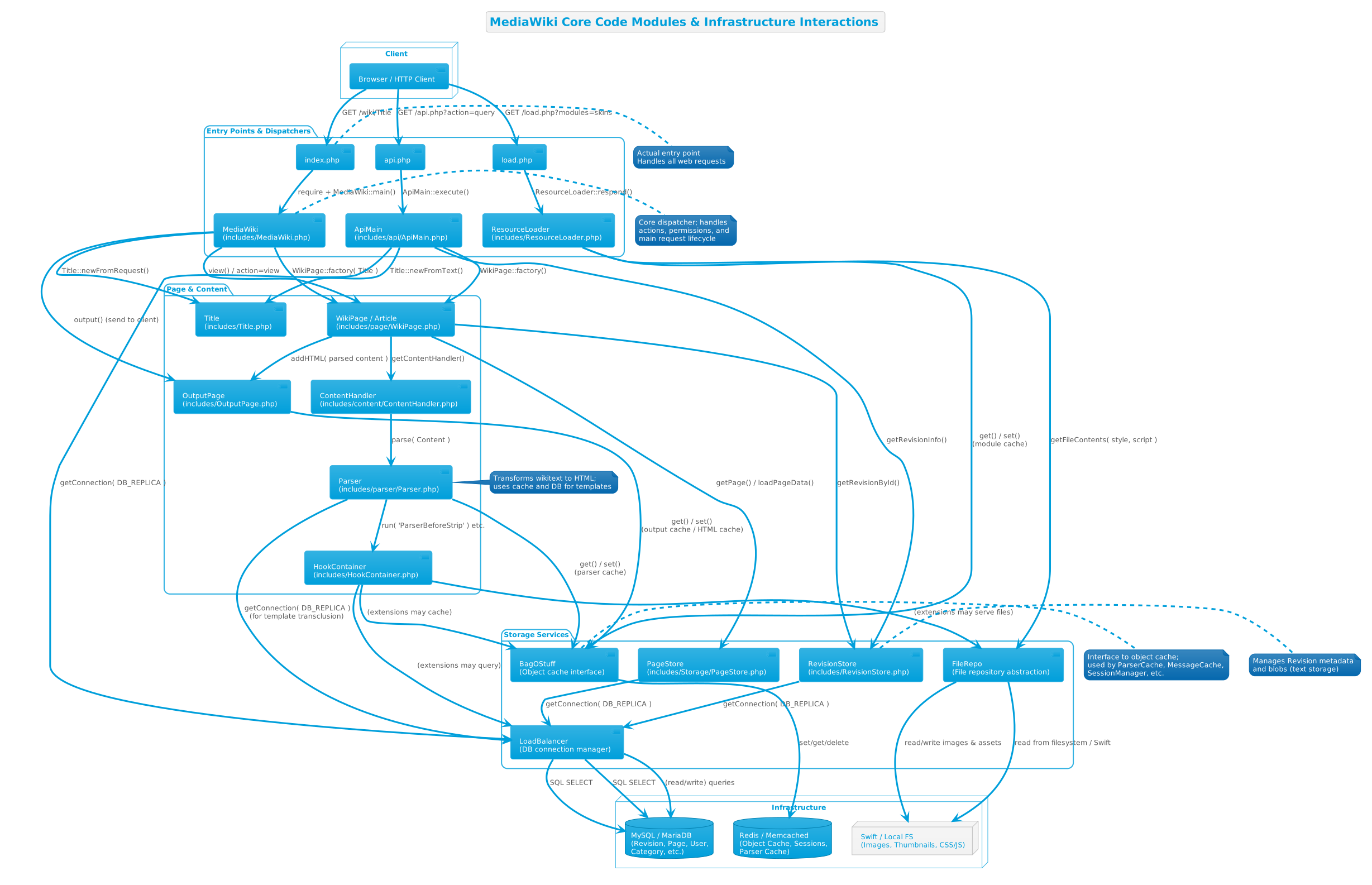
MediaWiki in action
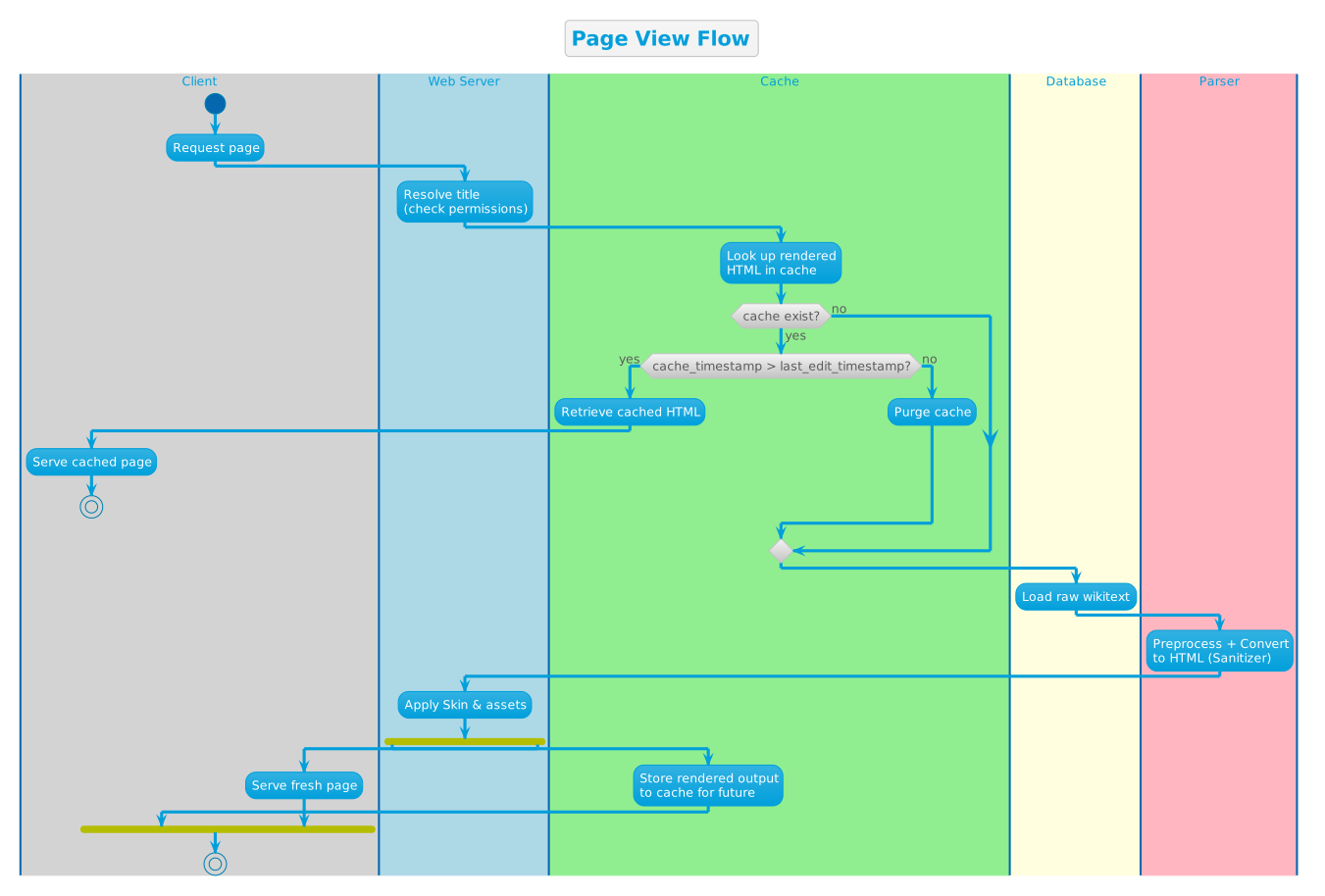
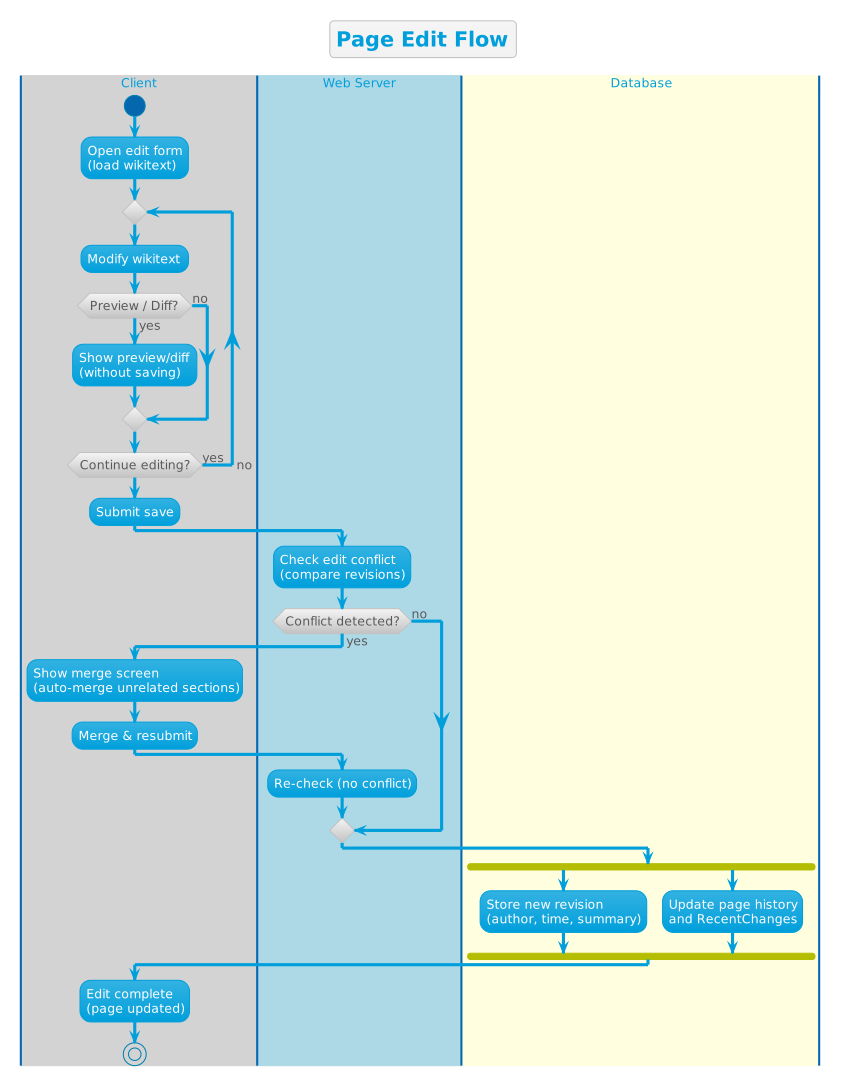
There are two core flows in MediaWiki: page view and page write.
Page view
Page write
Key design decisions
Principle content is created and stored in wikitext
MediaWiki stores pages as wikitext in DB. The rendered HTML, exists only as cache.
Why?
Mediawiki software is conceived for wikis, which in their most radical form allows editing from anyone, including odd-time readers lacking any computer programming knowledge correcting a spelling mistake. Therefore, an intuitive editing experience is extremely important in MediaWiki.
HTML, the standard markup language for web content, is verbose and hostile to non-programmers. Every element, body text, image, or list elements need tags, usually two, sometimes more. A misplaced or missing tag may prevent the entire page from being rendered correctly. To eliminate the need of direct HTML editing, Wikitext, a lightweight markup language directly translatable into HTML, was created.
On MediaWiki instances, users edit wikitext. As frequent editing is expected, it is only natural to also store content in this format, not HTML,to avoid resource-intensive parsing and deparsing on each revision.
The parser stays stable, always stable
The MediaWiki parser, which parses wikitext into HTML, is arguably the most essential part of MediaWiki core. Every single wiki page depends on it.
As such, any proposed changes to the parser must survive extensive scrutiny before being implemented. Inconveniently, the MediaWiki parser was written in the early 2000s by amateurs, taking inspiration from multiple wikitext parsers written separately in the 1990s: notably UseModWiki and WikiWikiWeb, which lacked any formal specification. The result? To this day the Mediawiki-flavoured wikitext has not received a formal specification: it grew organically in respond to user demands over the years and simply cannot be described by a formal grammar. There is however an unofficial spec: "whatever the parser spits out, plus a few hundred test cases".
The solution to the problem was to develop a second parser alongside the primary parser. The second parser, as MediaWiki contributors agreed, would not take on any actual functionality until it is proven reliable. The development of the second parser, Parsoid, began in 2012, originally with the aim of supporting MediaWiki's new visual editor. Originally written in Javascript, it was ported to PHP in 2019 for native bundling with the PHP MediaWiki backend. At the time of writing (2026-08), Parsoid is planned to become the unified parser for the entire MediaWiki system for the next release, version 1.47.
Templates, lots of templates
Templates let a wiki define something once and reuse it everywhere — a navigation box, a banner, an infobox. A page calls a template with {{Name}}, and the template's content is expanded into the page at read time .
MediaWiki implemented templates in version 1.3 (2004). For large instances like Wikipedia, this was transformative: the same boilerplate, which used to be copied onto thousands of articles, now only need to be defined once, making error correction and updates much easier. Over time, templates, as one of the most used feature in MediaWiki, was enhanced to near-Turing-completeness with pseudoprogrammatic constructs like {{#if:…}} and {{#switch:…}}.
There was however a price to pay: Template-heavy pages became slow to parse, really slow. The MediaWiki mitigated the issue in MediaWiki 1.12 (2008) by rewriting the preprocessor: the new preprocessor parses templates into a tree and skips the branches that are never used, such as the un-taken cases of a {{#switch:}}. Template-heavy pages got much faster, without any change to the markup.
Skins separate content from presentation
A skin is the frame around the content: the header, footer and sidebar, plus the CSS and JavaScript that style them. It allows the same wikitext content, itself containing little formatting information, to be rendered into beautiful webpages for readers.
In MediaWiki, the skin system was first implemented in version 1.3 (2004), introducing MonoBook as the new default and replacing the older "Standard" look.
The skin system separates presentation from content. It ensures 3 things:
- Uniformity across pages: The same navigation, branding, and layout are applied to every page without touching the article text. A wiki can change its entire visual identity by swapping a single skin, without touching the actual content of any article.
- User preference: Registered users can choose their own skin (e.g., MonoBook, Vector, or modern variants) independently of the wiki's default, personalising their experience without impacting others.
- Device adaptation: Skins allow the same underlying HTML to be styled for desktop, tablet, and mobile differently.
The technical implementation of skin evolved over time. Early skins used raw PHP templates with intermixed logic, until MediaWiki 1.12 (2008) introduced the SkinTemplate class and a QuickTemplate system that gave skins a cleaner data-oriented interface. More recently, version 1.35 (2020) introduced Mustache-based templating, allowing skins to be defined with logicless templates, making them easier for front-end developers to customize without touching PHP.
The main challenge with complex skins is caching complexity. The same page can look drastically differently depending on which skin is being used, so the cached HTML for one skin cannot be reused for another. As such, large instances allowing arbitrary user skins suffer inevitably from cache fragmentation: a page does not just need to be cached once, but numerous times for each supported skin. Moreover , skins that heavily rely on JavaScript for interactivity (e.g., the sticky header in Vector 2022) must be carefully optimised for loading time: a poorly optimized skin can add hundreds of milliseconds to page rendering, resulting in a sluggish feeling on slower devices.
The skin-specific hooks introduced in version 1.11 (2007) for injecting custom data into the page output caused another performance concern. Every hook adds complexity and can break when the skin is updated, making maintenance a challenge for large instances like Wikipedia, which now maintains a tightly controlled set of skins to ensure consistent performance and accessibility across billions of pageviews.
The ResourceLoader, introduced in MediaWiki 1.17 (2011), allows skins to declare and load their CSS and JavaScript modules on demand, with minification and concatenation built in, improving performance.
Extensions plug in; the core stays stable and small
MediaWiki's core is deliberately small: it contains the bare-minimum necessary for a running wiki instance. Additional functionalities live in extensions. They attach to the core through hooks — places where third-party code can run before, after, or instead of MediaWiki's own behaviour for a given event . Some hooks even let an extension add new wikitext syntax of its own .
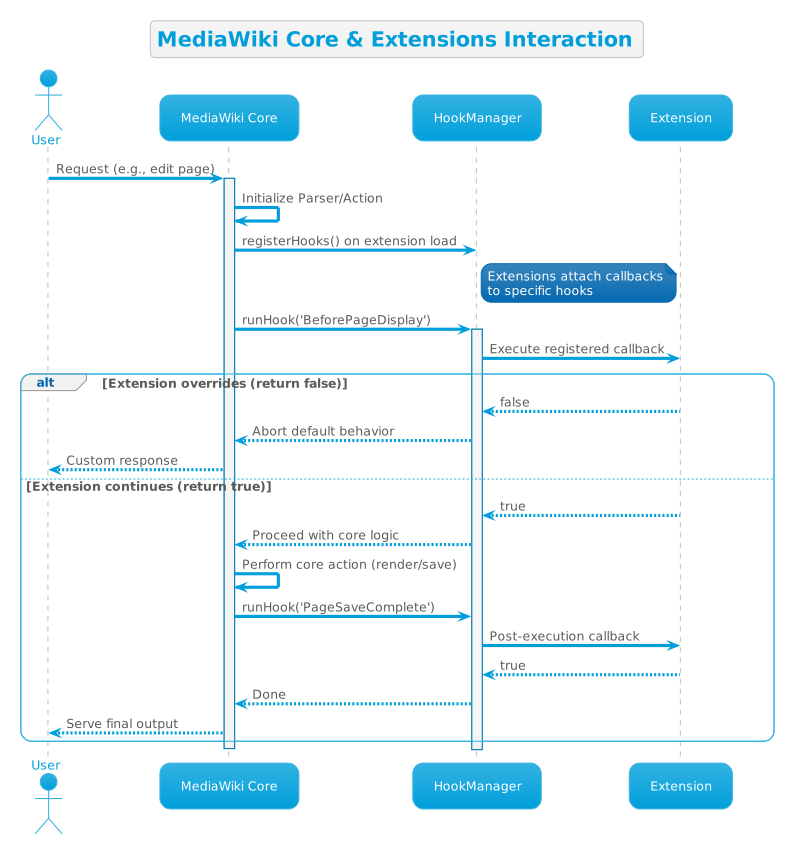
The hook system allows MediaWiki to respond to user demands rapidly while staying robust. Adding extra functionalities means enhancing existing extensions or writing new ones, not editing the core.
Caching, lots of caching
PHP has no concept of connection pooling or application memory. Without a proper caching system, PHP backend performance becomes catastrophic at scale, as every request must execute PHP code through the entire program logic.
For optimal performance, MediaWiki uses multiple layers of caches :
| Layer | What it stores | Effect |
|---|---|---|
| Reverse proxy (CDN) | whole rendered pages | serves anonymous readers without booting PHP at all, with it most requests never reach the application servers |
| Object cache (Memcached / Redis) | parsed page output | avoids re-parsing the same wikitext |
| Opcode cache | compiled PHP | skips recompiling scripts on every request (handled automatically by modern PHP) |
The key challenge for caching MediaWiki is staleness. On large public instances like Wikipedia with permissive editing permissions, pages are bing edited every second, which means even caches created in the minute may become stale.
To solve the problem, MediaWiki attaches a timestamp to all cached content. At render time, that timestamp is compared with the timestamp of the last revision, and the cached content is only served if the cache is newer than the last revision.
Try it yourself
All commands below were verified to work at the time of writing (2026-08-28) against this wiki (MediaWiki 1.46.0 [2]).
# Which version is this wiki running?
curl -s "https://wikibase.ronzz.org/api.php?action=query&meta=siteinfo&siprop=general&format=json" | grep -o '"generator":"[^"]*"'
Output:
"generator":"MediaWiki 1.46.0"
# See the parser's HTML output for a page (the raw pipeline result, before the skin)
curl -s "https://wikibase.ronzz.org/api.php?action=parse&page=Main_Page&format=json" | grep -o "<p><strong>[^<]*"
Output:
<p><strong>Hi, welcome to ronzz.ORG's wikibase.
# Preview without saving: run a snippet of wikitext through the parser
curl -sG "https://wikibase.ronzz.org/api.php" --data-urlencode "action=parse" --data-urlencode "text='''Bold''' and ''italic''" --data-urlencode "format=json" | grep -o "<b>.*</i>"
Output:
<b>Bold</b> and <i>italic</i>
# Every edit leaves a trace: the last three revisions of Main Page
curl -s "https://wikibase.ronzz.org/api.php?action=query&prop=revisions&titles=Main_Page&rvprop=timestamp%7Cuser&rvlimit=3&format=json" | grep -oE '"user":"[^"]*"|"timestamp":"[^"]*"'
Output:
"user":"Rongzhou"
"timestamp":"2026-08-24T14:55:13Z"
"user":"Rongzhou"
"timestamp":"2026-08-21T06:08:37Z"
"user":"Rongzhou"
"timestamp":"2026-08-19T18:59:55Z"
See the preprocessor stage directly: Visit Special:ExpandTemplates
- paste
{{HowItWorks}}into the input box and click "Expand" — - you see the expanded wikitext, before the parser turns it into HTML.
References
- Manual:MediaWiki architecture — the architecture deep-dive on mediawiki.org
- This wiki's siteinfo API — version, PHP and database, extension list (fetched 2026-08-28)
- Manual:Skins — skins documentation
- Help:Editing pages — user documentation for editing
- MediaWiki — the software project page
- Help:Edit conflict — how conflicts are detected and resolved
- Release notes/1.12 — the preprocessor rewrite
- Revisions query (ids|timestamp|user|comment) — verified 2026-08-28
- Parse API for Main Page — verified 2026-08-28
- Parse API with raw text — verified 2026-08-28
- Revisions query (timestamp|user) — verified 2026-08-28
Further reading
- Manual:MediaWiki architecture — the canonical architecture deep-dive (also a chapter of the Architecture of Open Source Applications book)
- Manual:Contents — the technical manual of the software
- MediaWiki — the software project page
The reference layer for this site's own data lives in the SPARQL cheatsheet: the sheet is the syntax, this page is the machinery.
Wiki: wikibase.ronzz.org